# Fider •

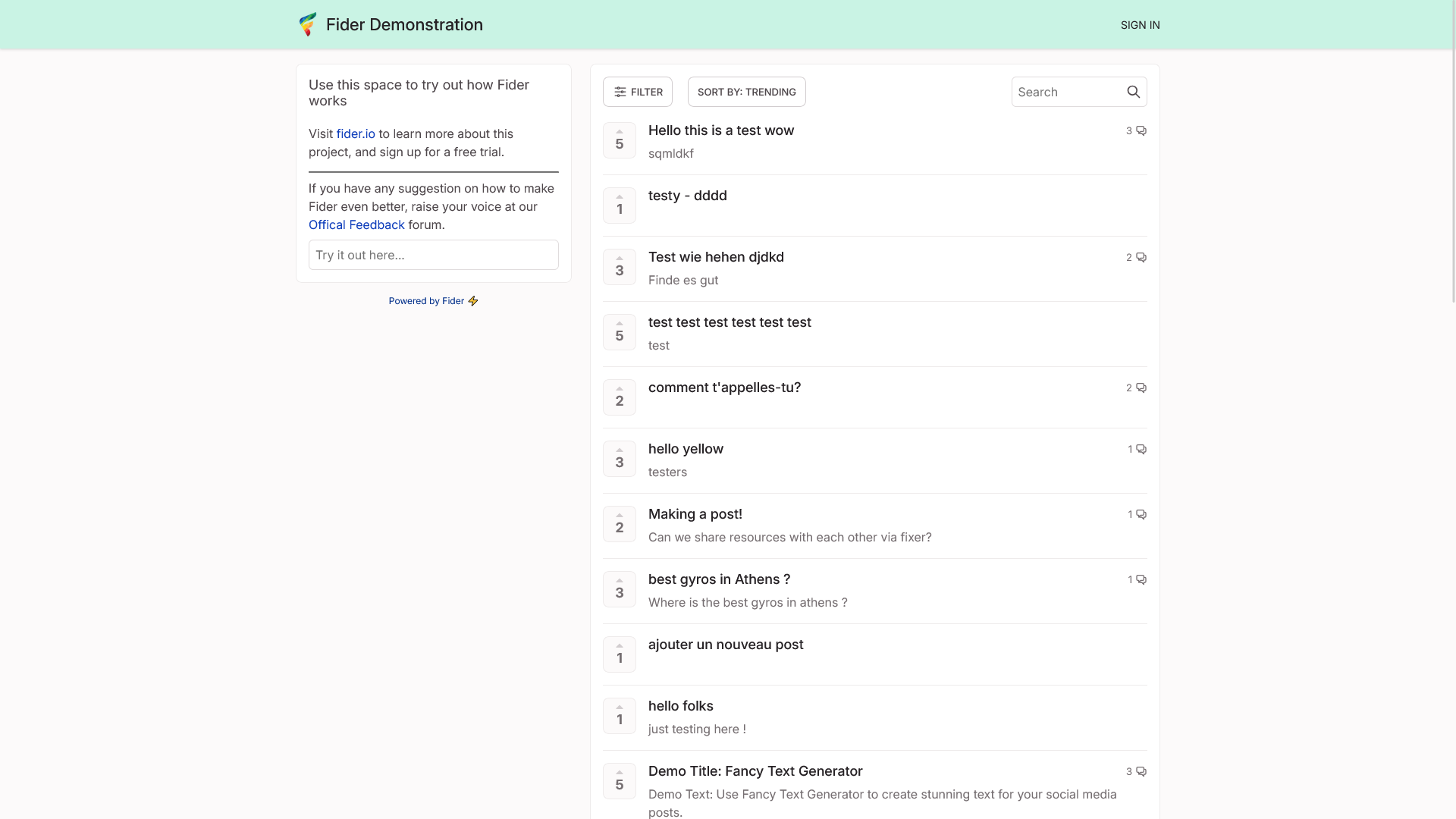
[Fider](https://fider.io/) is a platform for collecting and prioritizing project feedback that enables users to share in the process.

# Overview

[![Screen Shot 2025-03-09 at 20.50.10.png](https://hub.subspace.services/uploads/images/gallery/2025-03/scaled-1680-/screen-shot-2025-03-09-at-20-50-10.png)](https://hub.subspace.services/uploads/images/gallery/2025-03/screen-shot-2025-03-09-at-20-50-10.png)

[Fider](https://fider.io/) is a platform for collecting and prioritizing project feedback that enables users to share in the process.

<p class="callout success">Tryout an [Fider demo](https://demo.fider.io/).</p>

- Help your community share feedback, vote on what's important to them and discuss the finer points.
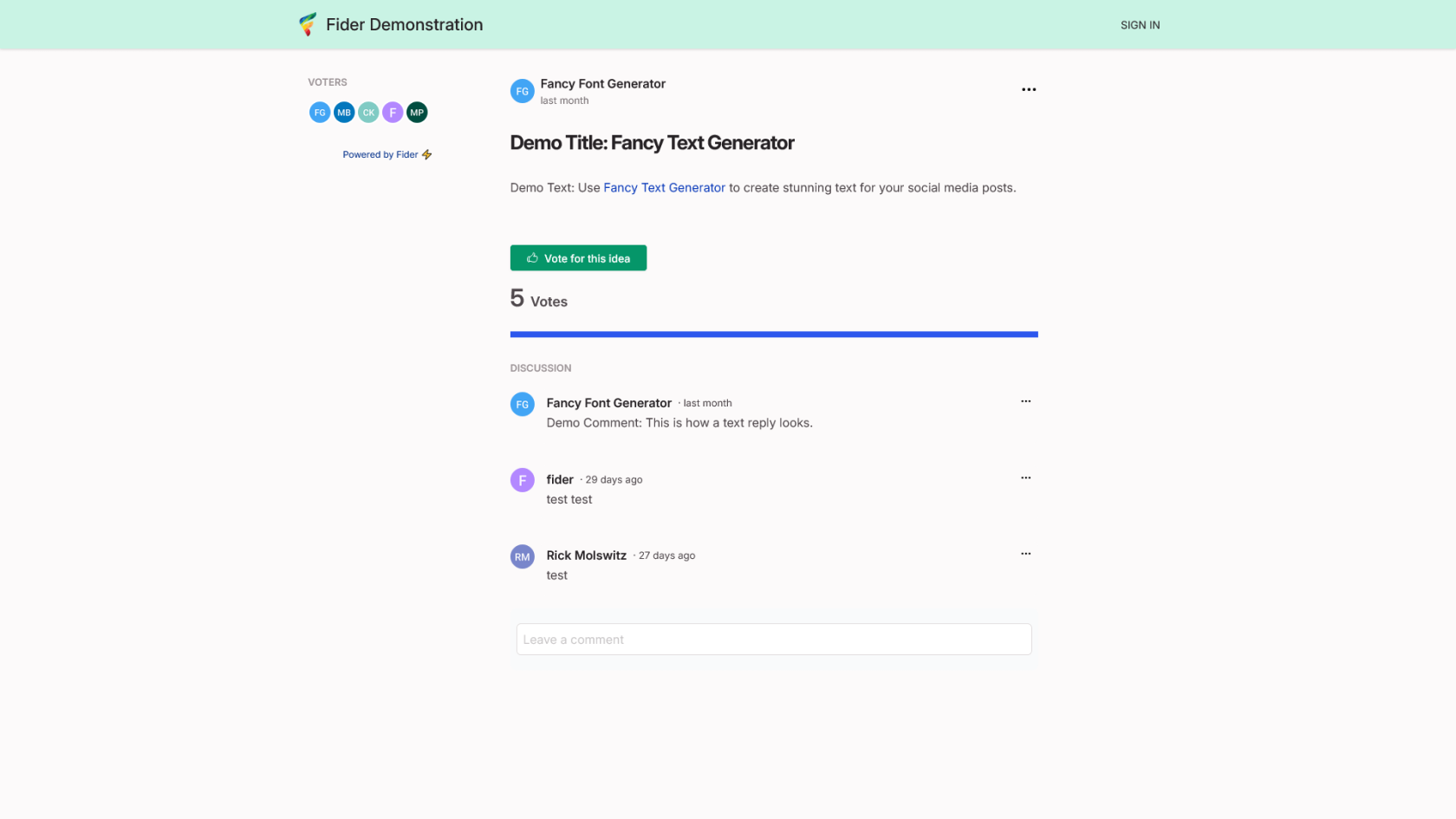
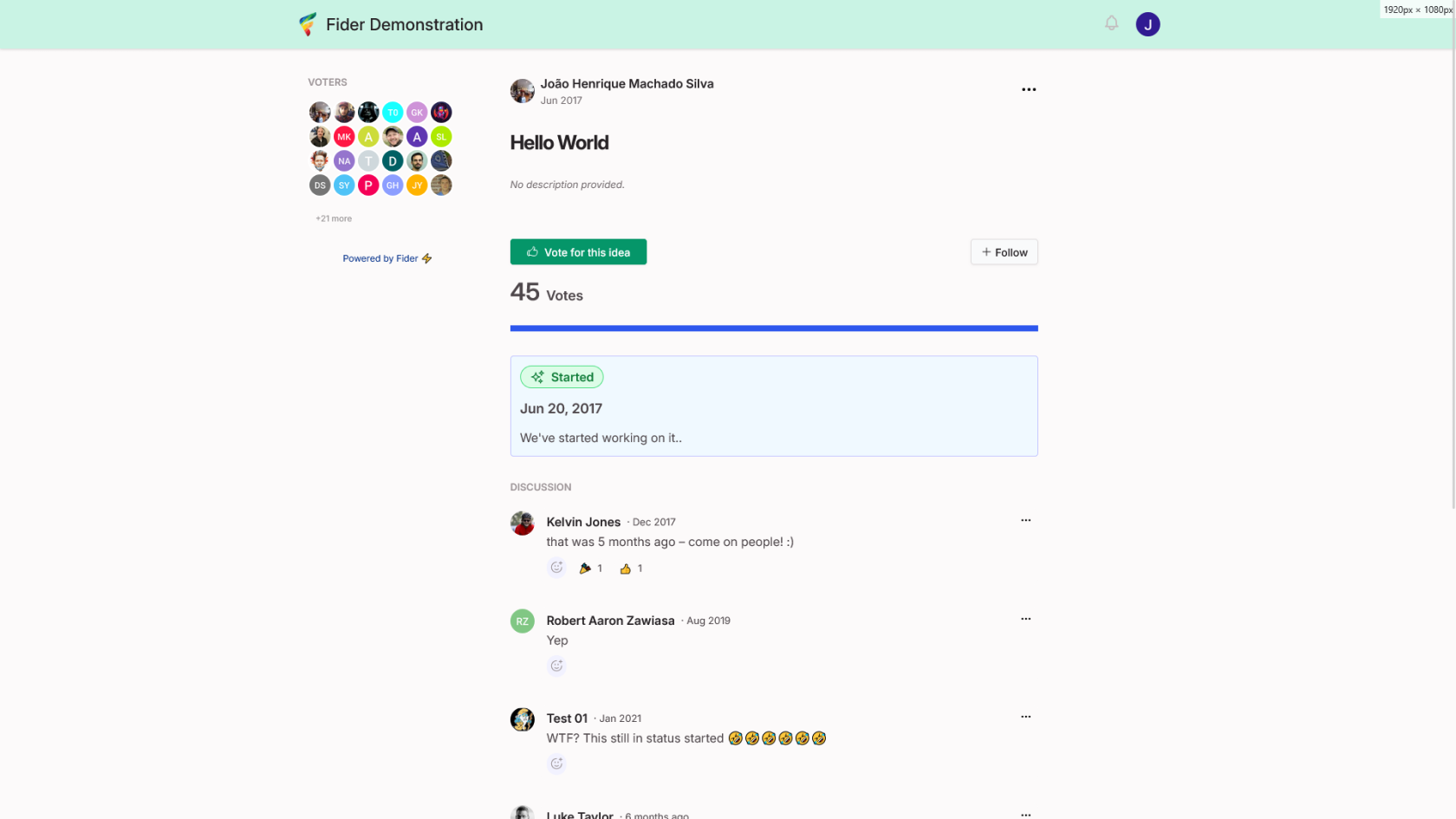
- Keep everyone up-to-date when you start or complete a feature based on community feedback.
- Customize with your own CSS or integrate with your existing communication services.

# Media

## Screenshots

<p class="callout info">Fider v0.24.0</p>

<table border="1" id="bkmrk-" style="border-collapse: collapse; width: 100%; border-width: 1px; height: 59.6px; border-color: rgb(88, 110, 117);"><colgroup><col style="width: 33.3333%;"></col><col style="width: 33.3333%;"></col><col style="width: 33.3333%;"></col></colgroup><tbody><tr style="height: 29.8px;"><td style="border-width: 1px; height: 29.8px; border-color: rgb(88, 110, 117);">[![Screen Shot 2025-03-09 at 20.50.10.png](https://hub.subspace.services/uploads/images/gallery/2025-03/scaled-1680-/screen-shot-2025-03-09-at-20-50-10.png)](https://hub.subspace.services/uploads/images/gallery/2025-03/screen-shot-2025-03-09-at-20-50-10.png)</td><td style="border-width: 1px; height: 29.8px; border-color: rgb(88, 110, 117);">[![Screen Shot 2025-03-09 at 20.50.18.png](https://hub.subspace.services/uploads/images/gallery/2025-03/scaled-1680-/screen-shot-2025-03-09-at-20-50-18.png)](https://hub.subspace.services/uploads/images/gallery/2025-03/screen-shot-2025-03-09-at-20-50-18.png)</td><td style="border-width: 1px; height: 29.8px; border-color: rgb(88, 110, 117);">[![Screen Shot 2025-03-09 at 20.50.47.png](https://hub.subspace.services/uploads/images/gallery/2025-03/scaled-1680-/screen-shot-2025-03-09-at-20-50-47.png)](https://hub.subspace.services/uploads/images/gallery/2025-03/screen-shot-2025-03-09-at-20-50-47.png)</td></tr><tr style="height: 29.8px;"><td style="border-width: 1px; height: 29.8px; border-color: rgb(88, 110, 117);">[![Screen Shot 2025-03-09 at 20.53.16.png](https://hub.subspace.services/uploads/images/gallery/2025-03/scaled-1680-/screen-shot-2025-03-09-at-20-53-16.png)](https://hub.subspace.services/uploads/images/gallery/2025-03/screen-shot-2025-03-09-at-20-53-16.png)</td><td style="border-width: 1px; height: 29.8px; border-color: rgb(88, 110, 117);">  
</td><td style="border-width: 1px; height: 29.8px; border-color: rgb(88, 110, 117);">  
</td></tr></tbody></table>

# Setup & Configuration

We need to install the service through Portainer and configure any necessary settings.

# Preparation

There are some things we need to do in preparation to install this service.

## Volumes

<details id="bkmrk-media-folders-radarr"><summary>Persistent Data</summary>

This is where the service will store its own application data and ensures we can quickly update the service image.

<p class="callout warning">Ensure your user has permissions to access the folder.</p>

</details>## Environment

<details id="bkmrk-tz-this-is-the-curre"><summary>DB\_USER</summary>

This is the user name that will be used behind the scenes to log into the database.

<p class="callout info">*For example:* fider\_admin</p>

</details><details id="bkmrk-gid-%C2%A0"><summary>BASE\_URL</summary>

This is the URL that the service will be hosted and accessible through.

<p class="callout info">*For example:* fider.example.com</p>

</details><details id="bkmrk-email_noreply-this-i"><summary>EMAIL\_NOREPLY</summary>

This is the email address that will be attached to email notifications and should not be replied to because the inbox is not monitored or is non existent.

<p class="callout info">*For example:* noreply@fider.example.com</p>

</details><details id="bkmrk-email_smtp_host-this"><summary>EMAIL\_SMTP\_HOST</summary>

This is the host address of your email server.

<p class="callout info">*For example:* smtp.gmail.com</p>

</details><details id="bkmrk-email_smtp_port-this"><summary>EMAIL\_SMTP\_PORT</summary>

This is the port used by your email server.

<p class="callout info">*For example:* 587</p>

</details><details id="bkmrk-email_smtp_username-"><summary>EMAIL\_SMTP\_USERNAME</summary>

This is the account user name used by your email server.

<p class="callout info">*For example:* example@gmail.com</p>

</details><details id="bkmrk-email_smtp_enable_st"><summary>EMAIL\_SMTP\_ENABLE\_STARTTLS</summary>

This enables [StartTLS](https://en.wikipedia.org/wiki/Opportunistic_TLS), which is used by the email server to upgrade insecure connections to one using TLS or SSL.

<p class="callout info">*Recommended:* true</p>

</details>### Passwords

<p class="callout danger">Keep these securely stored in a password manager, such as [VaultWarden](https://hub.subspace.services/books/vaultwarden "VaultWarden").</p>

<details id="bkmrk-db_root_pass-this-is"><summary>DB\_PASS</summary>

This is the password that will be used for root access to the database.

<p class="callout warning">It is important to use secure, randomly generated password.</p>

You can use a random alphanumeric string from a password manager, or open the terminal and run the command:

```
tr -dc 'A-Za-z0-9!"#$%&'\''()*+,-./:;<=>?@[\]^_`{|}~' </dev/urandom | head -c 32; echo
```

This pulls a random string from the '[urandom](https://en.wikipedia.org/wiki//dev/random)' device, removes unwanted characters and trim it to an appropriate length.

</details><details id="bkmrk-jwt_secret-this-is-t"><summary>JWT\_SECRET</summary>

This is the secret that will be used for validating users who are logged into the service.

<p class="callout warning">It is important to use secure, randomly generated token.</p>

You can use a random alphanumeric string from a password manager, or open the terminal and run the command:

```
tr -dc 'A-Za-z0-9!' </dev/urandom | head -c 32; echo
```

This pulls a random string from the '[urandom](https://en.wikipedia.org/wiki//dev/random)' device, removes unwanted characters and trim it to an appropriate length.

</details><details id="bkmrk-owncloud_admin_passw"><summary>EMAIL\_SMTP\_PASSWORD</summary>

This is the password for logging into your email account for sending administrative notifications.

<p class="callout warning">When possible, you should use app passwords.</p>

</details>

# Installation

The service can be installed through the Portainer web interface.

<p class="callout info">Learn about [creating a new stack](https://hub.subspace.services/books/portainer/page/creating-a-new-stack "Creating a New Stack").</p>

## Docker Compose

Use the following code to install the service:

```yaml
---
services:
  db:
    restart: always
    image: postgres:12
    volumes:
      - /srv/fider/db:/var/lib/postgresql/data
    environment:
      POSTGRES_USER: ${DB_USER}
      POSTGRES_PASSWORD: ${DB_PASS}
  fider:
    restart: always
    image: getfider/fider:stable
    ports:
      - "3380:3000"
    environment:
      BASE_URL: ${BASE_URL}
      DATABASE_URL: ${DB_URL}
      JWT_SECRET: ${JWT_SECRET}
      EMAIL_NOREPLY: ${EMAIL_NOREPLY}
      EMAIL_SMTP_HOST: ${EMAIL_SMTP_HOST}
      EMAIL_SMTP_PORT: ${EMAIL_SMTP_PORT}
      EMAIL_SMTP_USERNAME: ${EMAIL_SMTP_USERNAME}
      EMAIL_SMTP_PASSWORD: ${EMAIL_SMTP_PASSWORD}
      EMAIL_SMTP_ENABLE_STARTTLS: ${EMAIL_SMTP_ENABLE_STARTTLS}
```

## Environment

Use the following environment to configure the service using the values prepared earlier:

```bash
DB_USER=
DB_PASS=
BASE_URL=
DATABASE_URL=postgres://fider:${DB_PASS}@db:5432/fider?sslmode=disable
JWT_SECRET=
EMAIL_NOREPLY=
EMAIL_SMTP_HOST=
EMAIL_SMTP_PORT=
EMAIL_SMTP_USERNAME=
EMAIL_SMTP_PASSWORD=
EMAIL_SMTP_ENABLE_STARTTLS=
```

# Updating

<p class="callout warning">Backup and Re-Deploy the Stack</p>

This service has been optimized for running in Docker.

This allows you to [re-deploy the stack through Portainer](https://hub.subspace.services/books/portainer/page/updating-a-stack "Updating a Stack") to download the latest updates.

It is highly recommended that you manual backup data before installing any updates in the event that there are upgrade errors.

# User Manual

# Development

<p class="callout info">This software is released under the [AGPL-3.0 license](https://opensource.org/license/agpl-3-0). </p>

You can learn more about how to contribute to Fider through their [GitHub](https://github.com/getfider/fider/blob/main/CONTRIBUTING.md).

The development team also accepts [sponsorships](https://opencollective.com/fider).

# Resources

## Official

- [Official Documentation](https://docs.fider.io/)
- [Official Forum](https://github.com/getfider/fider/discussions)
- [Official GitHub Repository](https://github.com/getfider/fider)
- [Official Website](https://fider.io/)
- [Installation Guide](https://docs.fider.io/hosting-instance)