# How to Remotely Connect
When it comes to connecting to your services while away from home, there are two common methods to approach this: through connecting to a self-hosted [Virtual Private Network](https://hub.subspace.services/books/world-wide-web/page/what-are-computer-networks "What are Computer Networks?") or broadcasting your services to the World Wide Web. These techniques can be used individually or combined to create a tailored experience.
## Virtual Private Network
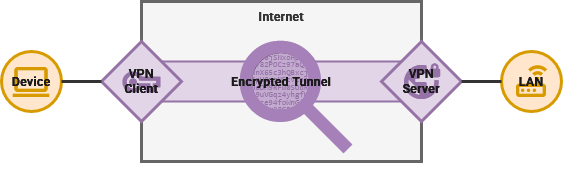
Just like a corporation or university, you can self-host a Virtual Private Network server from home. This enables anyone with the proper credentials to securely connect individual devices to your Local Area Network. This way, your services can be available to you, friends and family – even while away from your home – without making them accessible to the public internet.
This is clearly not the ideal for hosting a [WordPress](https://hub.subspace.services/books/wordpress "WordPress •") blog or [Flarum](https://hub.subspace.services/books/flarum "Flarum") forum intended for an online audience. VPN access can be the perfect balance of security and convenience for a small or exclusive audience – such as [Bookstack](https://hub.subspace.services/books/bookstack "BookStack •") for a tabletop roleplaying campaign. Some services may require using a web domain to properly function, but access can still be restricted to access from your LAN.
For accessing services that handle private personal information such as [Actual Budget](https://hub.subspace.services/books/actual-budget "Actual Budget •") or [Paperless-ngx](https://hub.subspace.services/books/paperless-ngx "Paperless-ngx"), this is the most secure option. By requiring authorization to remotely access your Network, you can greatly decrease your [attack surface](https://en.m.wikipedia.org/wiki/Attack_surface) – or the amount of publically-accessible software that may contain software vulnerabilities that can be leveraged by malicious actors.
These type of software vulnerabilities are commonly called [zero-day exploits](https://en.m.wikipedia.org/wiki/Zero-day_vulnerability) because they are either unknown or unfixed.
While open-source software [can improve security by putting more eyes on potential vulnerabilities](https://en.m.wikipedia.org/wiki/Linus%27s_law), it does not mean there will not be breaches. Software projects are written by developers with varying priorities, including security and privacy. You do not need to be as concerned about the security of individual software programs when everything is protected behind a singular VPN program.
**Comparison**
Security
**Security**
starsstarsstars
By requiring authentication before even connecting to any services, you can greatly decrease your overall attack surface.
Shield\_with\_heart
**Convenience**
**stars**circlecircle
This will need to be configured on a device-by-device basis. Once the service has been setup, you just need to make sure you stay connected.
[](https://hub.subspace.services/books/world-wide-web/chapter/virtual-private-network "Virtual Private Network")
## Web Domain Name
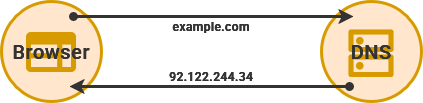
Self-hosting a web domain involves connecting your server to the World Wide Web. We accomplish this by linking the Public IP address assigned by your ISP to a domain name you control. This adds your public IP address to the [Domain Name System](https://en.m.wikipedia.org/wiki/Domain_Name_System) registry that helps web servers locate each other.
[Web domains](https://en.m.wikipedia.org/wiki/Domain_name) – such as [example.com](https://hub.subspace.services/example.com) – are hierarchical with deeper levels appended to the front. The URL above contains a top-level domain ("*com*") and a second-level domain ("*example*"), joined by a period. When you own a domain name, you can create additional sub-domains – like [app.example.com](https://hub.subspace.services/app.example.com).
Broadcasting your server on the World Wide Web makes it extremely simple to access your services from anywhere in the world using only a web browser. This is equally true for every person in the world who has access to the World Wide Web. At the end of the day, we are opening our server to the whims of the open internet – and any potential malicious actors.
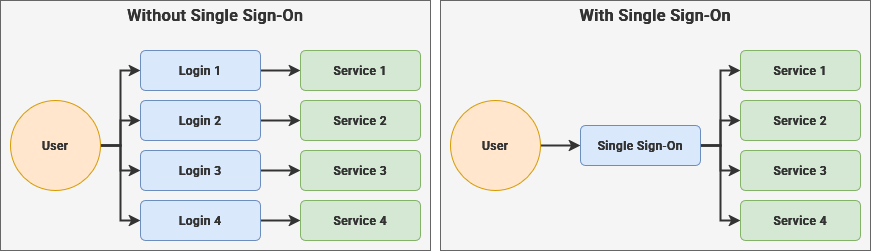
We will take proactive steps to harden security, preempt vulnerabilities and limit fallout. [SWAG](https://hub.subspace.services/books/swag "SWAG") makes it simple to setup secure encryption for our web domain. [Authelia](https://hub.subspace.services/books/authelia "Authelia •") is a single sign-on service that can decrease your attack surface by protecting your individual services with the same trusted authentication system. [Fail2Ban](https://hub.subspace.services/books/fail2ban "Fail2Ban") and [CrowdSec](https://hub.subspace.services/books/crowdsec "CrowdSec") are open-source solutions for automatically identifying and intercepting malicious actors.
**Comparison**
Security
**Security**
**stars**circlecircle
While you can take proactive steps to protect your data, it is still connected to the open internet.
Shield\_with\_heart
**Convenience**
starsstarsstars
Once setup, you can access your services anywhere in the world with just a web browser.
[](https://hub.subspace.services/books/world-wide-web/chapter/web-domain-name "Web Domain Name")
## Combination
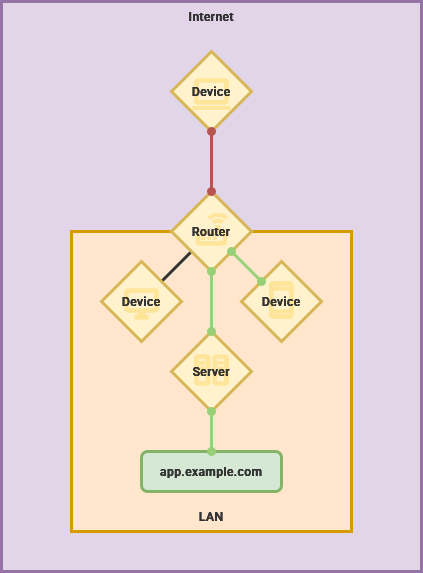
You can tailor your Web server as needed to find your preferred balance between security and convenience. We can leverage the convenience and memorability of web domain names while still retaining the security of a Virtual Private Network. This enables websites to be easily accessible while still denying access to anyone outside of our Local Area Network.
We can provide access to [Cockpit](https://hub.subspace.services/books/cockpit "Cockpit") at [cockpit.example.com](https://hub.subspace.services/cockpit.example.com), but deny access to anyone attempting to access it from outside your Wi-Fi or Ethernet network. At the same time, we can provide public access to a personal [WordPress](https://hub.subspace.services/books/wordpress "WordPress •") blog. When combined with a VPN, you can still provide secure remote access to private data and services.
diagram showing inside and outside access to a local restricted address.
**Comparison**
Security
**Security**
starsstarscircle
By requiring local access for critical services and leveraging single sign-on, you can have the best of both worlds.
Shield\_with\_heart
**Convenience**
starsstarscircle
Your Web server will always be accessible through a browser, with device-by-device setup required for accessing critical services.
[](https://hub.subspace.services/books/world-wide-web/page/lan-only-access "LAN Only Access")