# Domain
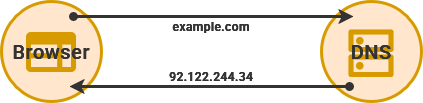
You will need a domain name – such as [example.com](https://example.com) – to directly access your services from outside your [Local Area Network](https://hub.subspace.services/books/world-wide-web/page/what-are-computer-networks "What are Computer Networks?") (LAN). We will using this domain name to forward traffic to our Public IP address on the [Wide Area Network](https://hub.subspace.services/books/world-wide-web/page/what-are-computer-networks "What are Computer Networks?") (WAN).
You can also access your services away from [home without a domain by using a VPN](https://hub.subspace.services/books/world-wide-web/page/how-to-remotely-connect "How to Remotely Connect"). Using a domain name can add a level of convenience for accessing your own services while [still restricting access to your local area network](https://hub.subspace.services/books/world-wide-web/page/lan-only-access "LAN-Only Access").
## Web Domain
Domain names are purchased through a domain registrar and there is a wide potential price range. Registrars often algorithmically assign prices for available domains based on [expected popularity](https://www.name.com/blog/how-much-does-a-domain-name-cost-a-breakdown-of-domain-pricing) and [ICANN](https://www.icann.org/) registration fees.
## Dynamic DNS
There are also free services that allow you to register an account and link your web server to their domain as a subdomain – such as [DuckDNS](https://duckdns.org) or a similar [Dynamic DNS](https://en.m.wikipedia.org/wiki/Dynamic_DNS) service on your router. These give you a sub-domain name to use – such as user.duckdns.org – that can be automatically updated to point at your server.
[](https://hub.subspace.services/books/world-wide-web/page/getting-a-domain-name "Learn More")