Your Personal Cloud
You can host your own cloud server at home using commodity hardware and open-source software.
- Welcome
- What is the Cloud?
- Getting Started
- Background
- Understanding The Requirements
- About the Author
- Next Steps
Welcome
You may know how to install a program on your computer, but might not even know where to start when asked how the cloud works. This is to be expected – that's how they were designed!

Modern open-source software can offer familiar online services and put you in complete control. Host a personal website, build a private cloud, or share with an online community. Connect your server to the World Wide Web with a domain name and modern router, or access all your services while away using a virtual private network.
cloudWhat is the Cloud?
In this five-part series, we will learn about the “cloud” – from the ground up – and use this new knowledge to build our own server. Aside from your curiosity, all you need to bring is an unused computer system – an excellent reason to explore the low-cost Raspberry Pi or repurpose an old computer.
Table of Contents
Through educational do-it-yourself guides we explore the hardware and software requirements for a home server, including quick-start examples. This process uses Debian Linux and Docker to quickly self-host your services through the browser-based interface.
What is the Cloud?
Computers are machines that can automatically process data based on defined rules – like logic and arithmetic. Humans have long explored purpose-built "analog" machines that perform specific tasks, such as the Antikythera mechanism from 200 BCE for calculating the position of stars and planets.

By the early 1900s, the programmable computer theorized by Charles Babbage and Ada Lovelace was finally demonstrated. While analog computers could reliably perform a pre-defined task, the Analytical Engine was the first to be "Turing-complete".
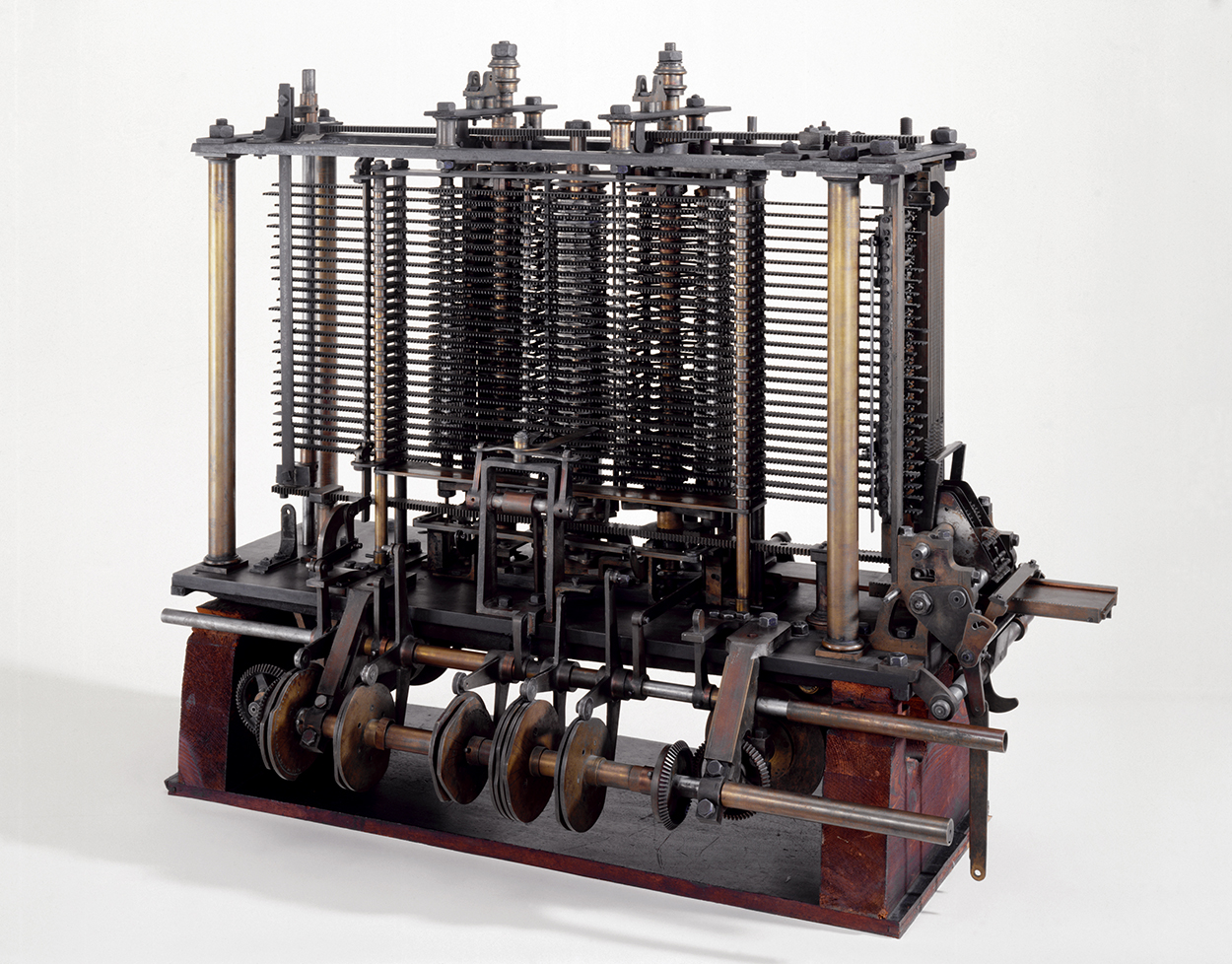
This new class of computers was capable of being programmed to perform specific tasks – like multiplication or conditional statements. This not only made computers more versatile, but ensured similar systems could share their programming.
Digital Systems
These first computers bear little resemblance to the discrete personal computers we use today. Analog systems used physical properties to perform their computations – such as connecting a circuit to turn on a warning light when the temperature within the room exceeds a certain threshold.
The first "digital" general-purpose computers were created in the early–mid 20th century. These systems transmit and process electrical signals to achieve the desired outcome. Colossus and ENIAC were both digital and programmable – meaning that the hardware could be instructed to perform new tasks even after the computer had been built.
Women were the first "computers" – tasked with maintaining the programming necessary to operate the first general-purpose digital computer systems.
|
|
|
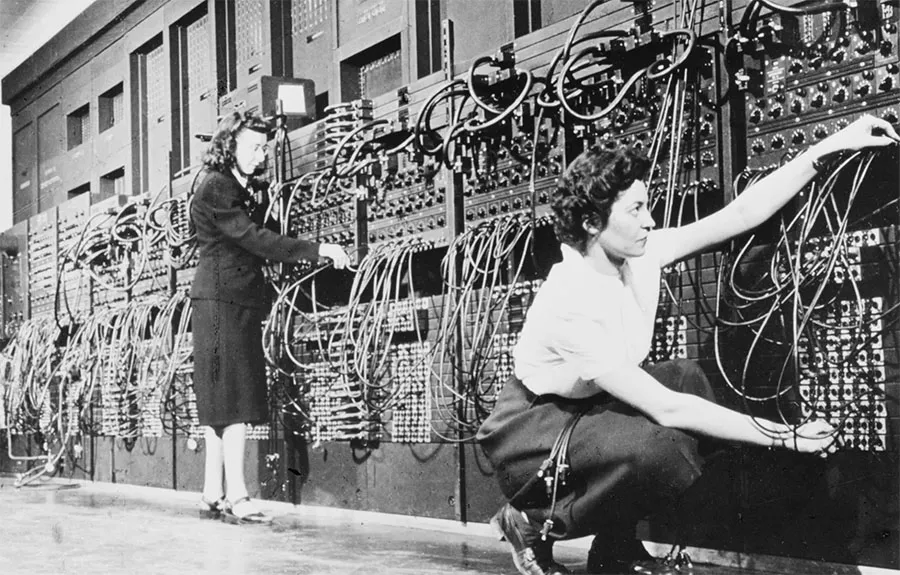
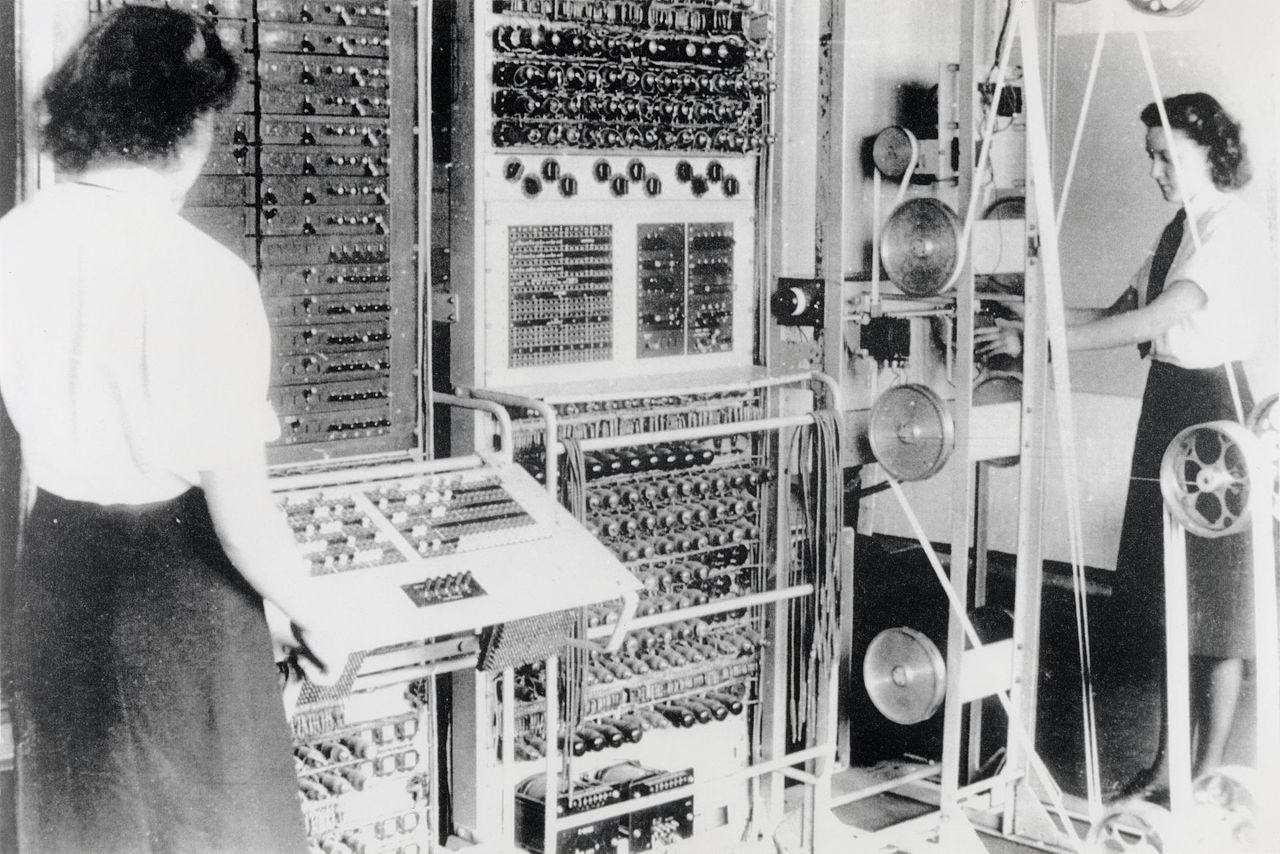
By the 1960s, digital computers were becoming more commonplace at large institutions, but were still largely inaccessible to many professionals and researchers, let alone everyday consumers. While hardware advances allowed computers to perform more complex tasks, software revolutionized the number of tasks that could be performed at once.
Local Sharing
Time sharing became a technique that allocated computer resources to multiple users, enabling true multi-tasking for the first time. In the past, programs ran in sequence and completely finished a single task before moving onto the next. Now, each user could run their own program and the computer would quickly cycle through each user's task, performing a little bit of each at a time.

People could connect to this shared computer system through a "terminal" – or a keyboard and monitor that transmitted data back and forth over a physical cable. This maintained the illusion of a personal computer that ran only their task when, in reality, it was a shared computer. Before the internet was even invented, we had begun our exploration into the concept of the modern "cloud".
|
|

Time sharing was expanded upon to create virtualization – or dividing a single computer into multiple virtual computers. This allowed the creation of isolated enclaves where each user – whether a person or corporation – could securely run their own programs without worrying about sharing resources.

Interconnection
In 1969, ARPANET (Advanced Research Projects Agency Network) marked the birth of the long-distance Internet. During this time, the foundations were laid for the same "TCP/IP" standards we still use to this day. Using these new tools, researchers (and their computers) could share their resources across vast distances.
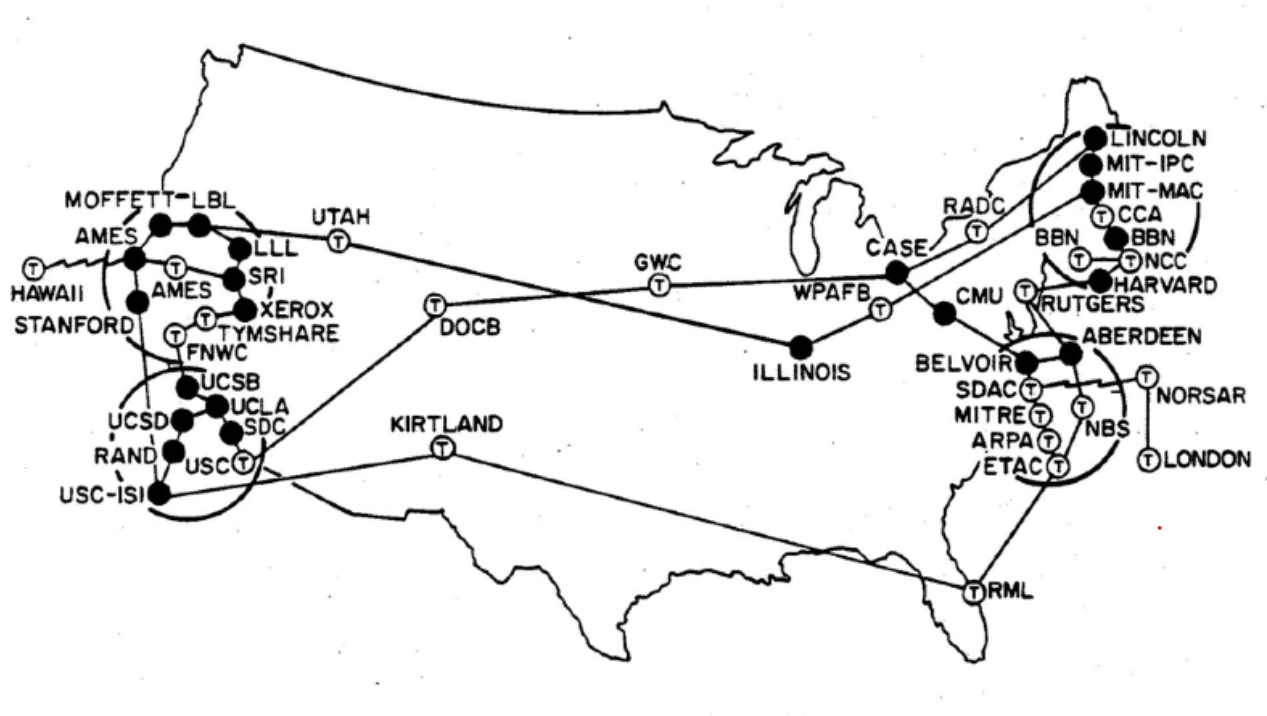
By 1991, the World Wide Web as we know it was released to global consumers. With a subscription to an internet service provider, anyone could connect to the World Wide Web. Before the turn of the century, the first theory of cloud computing defined a foundation for scalable servers.
This enabled independent computers to be linked together over a network and share their resources towards supporting a unified service. Distributed computing enabled websites to support a hundred thousand users by balancing the work load across multiple computers instead trying to juggle everyone using one system.

Whenever a service was accessed over the internet, the user could be geo-located and directed to the server that was closest to them. This provided a better connection, split the workload and created more space for data storage. As a result, data centers quickly proliferated across the globe.
Data Centers
By the early 2000s, technology companies had invested heavily into data center infrastructure. Through this model, businesses could forego hosting their own server computers and instead rely on the infrastructure maintained by someone else.
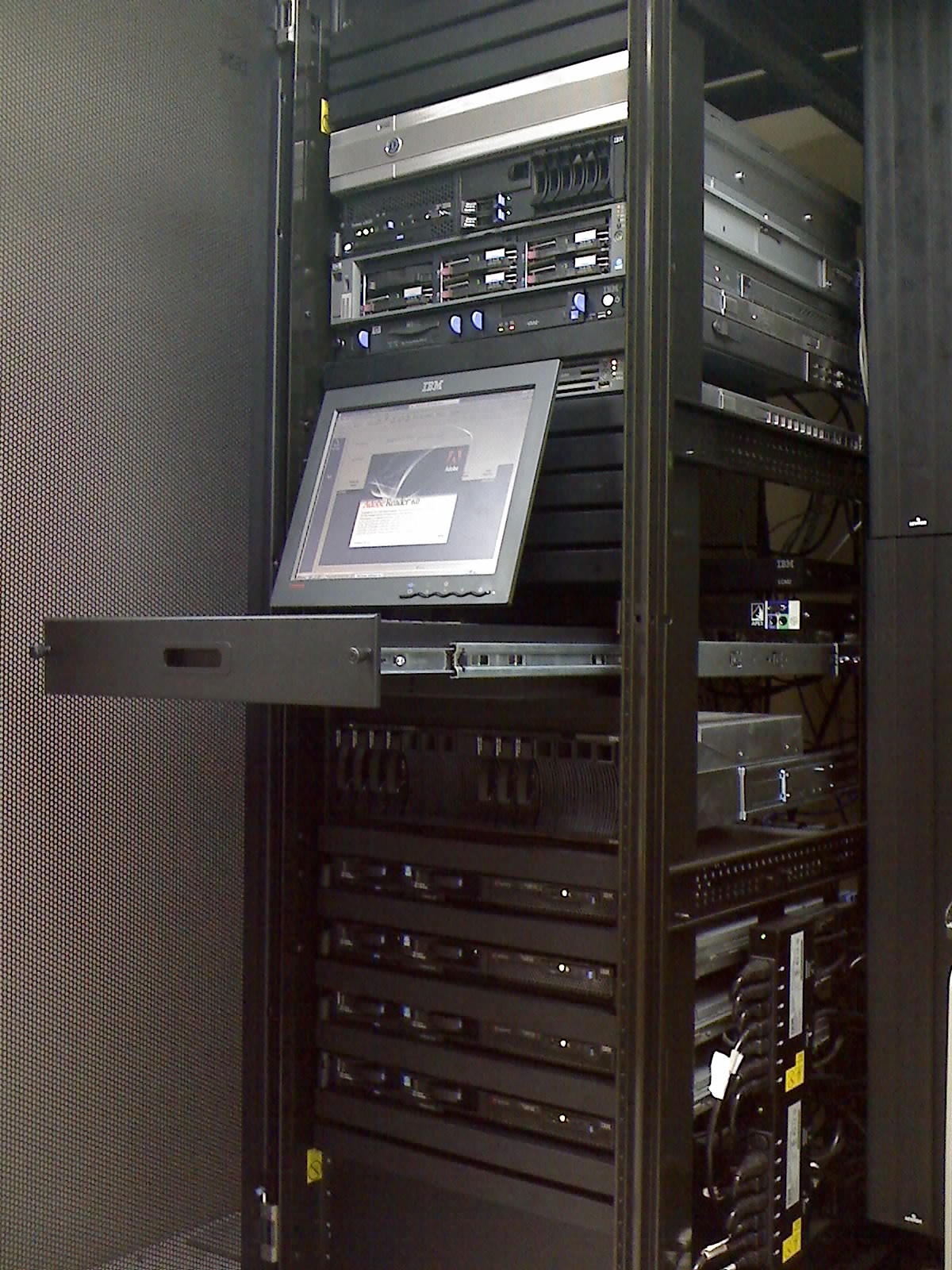
These distributed server farms became increasingly integrated into our every day lives – personally and professionally. Google and Apple both released services targeting corporations and consumers, offering access to cloud-based tools. Amazon introduced "cloud" computing and storage services, enabling businesses to rent computer resources – like processing power or storage space.
|
ARSAT Data Center |
Google Data Center |
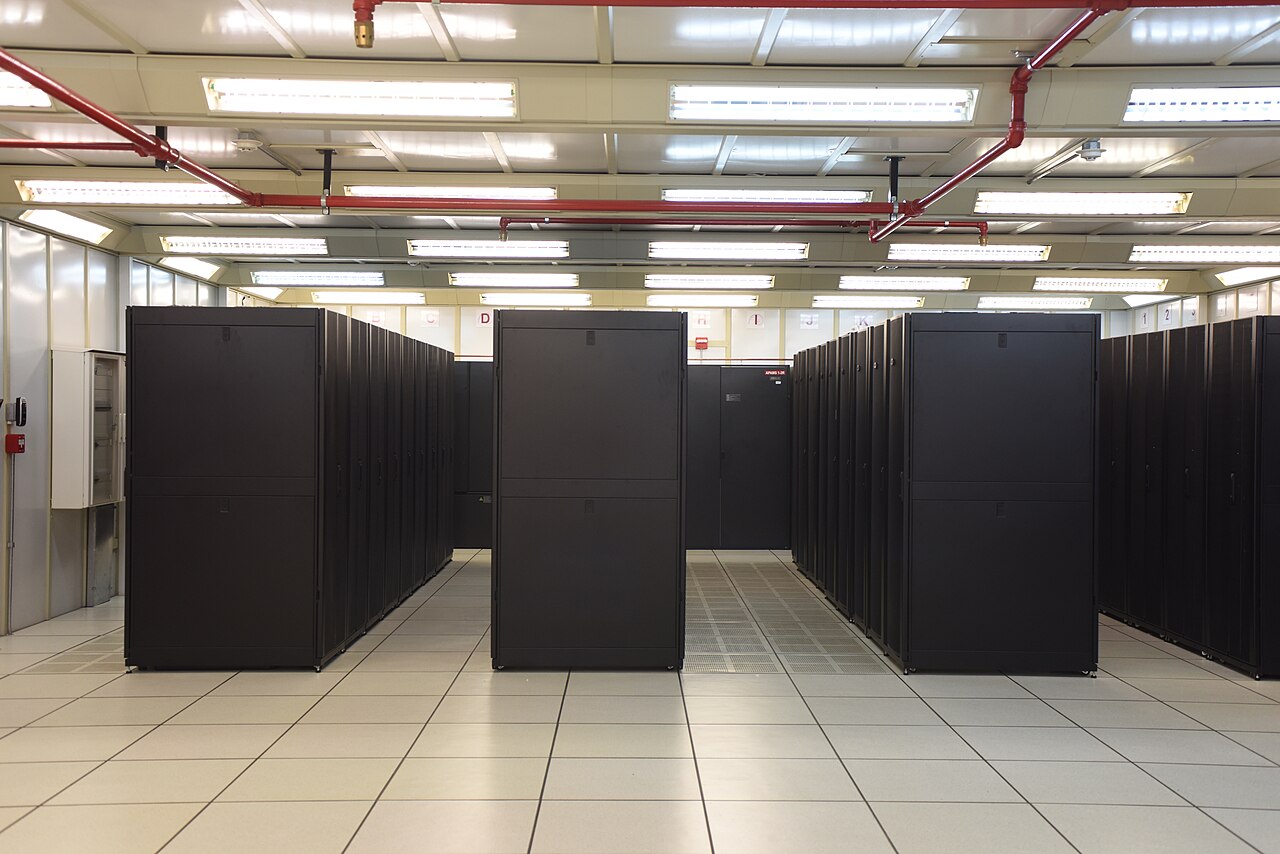

Take a look at the data centers located near you – there's more than you'd think!
Contemporary cloud computing combines virtualization, distributed computing, and secure internet connections to build vast server farm infrastructures around the globe. By dividing up server clusters into isolated software environments, data centers create the digital equivalent of an apartment building housing multiple tenants.
When contracting out digital infrastructure services, corporations may lose physical ownership of data. Realistically, it can be nearly impossible to keep track of what data is stored where. Under this paradigm, corporations have the potential to shirk their responsibility for digital stewardship – or how they keep data safe, secure and up-to-date.
Everything as a Service
The decentralized infrastructure of data centers has fomented considerable uncertainty about data privacy, unauthorized access and legal compliance. When digital data exists outside the physical control of a company, can they reliably ensure security? On the other hand, could leaving data storage up to industry professionals improve its baseline security?
Data centers, for better or worse, are the dominant paradigm and currently power much of the internet. They are now a driving force behind the proliferation and expansion of technologies around the globe. Any digital service can be provided as a paid subscription using this pervasive business practice.

This vast infrastructure has led to a standardized "cloud computing" service model focused on a granular spectrum. This dictates how much of the service is managed by the client versus the cloud computing service provider:
|
Dns |
The practice of a provider renting digital systems to clients to fulfill their needs – such as servers, networks and Internet service.
|
| Code_blocks |
Subscription to service that facilitates the rapid deployment of software – such as platforms like Docker and Kubernetes.
|
| Terminal |
Connects people, occasionally on behalf of an intermediary like a corporation or school, to web-based software – such as office and file-hosting services.
|
| Function |
Specific functions to be completed and paid per usage – such as automated image or data processing.
|
On one end, the client maintains complete control over how they can utilize their rented hardware. On the other, everything occurs completely behind-the-scenes without the client ever being aware.

While these technologies were groundbreaking for creating global internet platforms, they have had countless impacts on privacy and technology development. You may lose access to your data at any point because a service provider decides they don't want to host your content.
With its current trajectory, cloud computing threatens to completely monopolize and privatize the very infrastructure that powers the Internet. It is currently estimated that more than 85% of global business are expected to adopt a "cloud-first" approach by 2025.
Large-scale data centers use exponentially more power than a home server – consuming up to 100 times more than a standard office building. For example, a small data center with 500 servers may require 1 megawatt of power – equivalent to 200 American households.
Data Center Scale
| Scale | Servers | Power Capacity |
| Small | 500 – 2,000 | 1 – 5 MW |
| Medium | 2,000 – 10,000 | 5 – 20 MW |
| Large | 10,000+ | 20 – 100 MW |
Describe and illustrate difference between w kilowatt and megawatt
Similar to personal computers, data centers can enter idle states where they consumes less power. Entire server racks will turn on and off depending on how much work needs to be done. This will result in a data center's power consumption fluctuating.
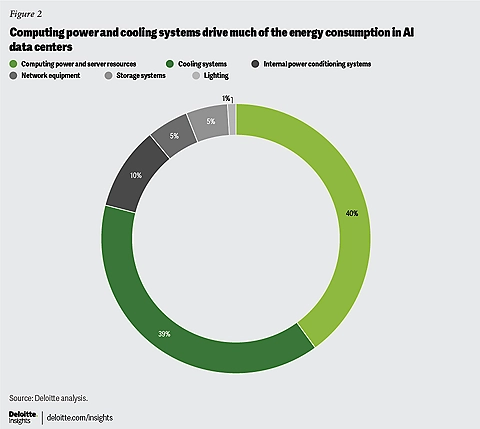
Globally, computer and network technologies are estimated to consume 10% of all energy produced. Of this, data centers consume about 20% – with this expected to continue rising with the rise of machine learning. Two broad categories use nearly 80% of this power: hardware and cooling systems.
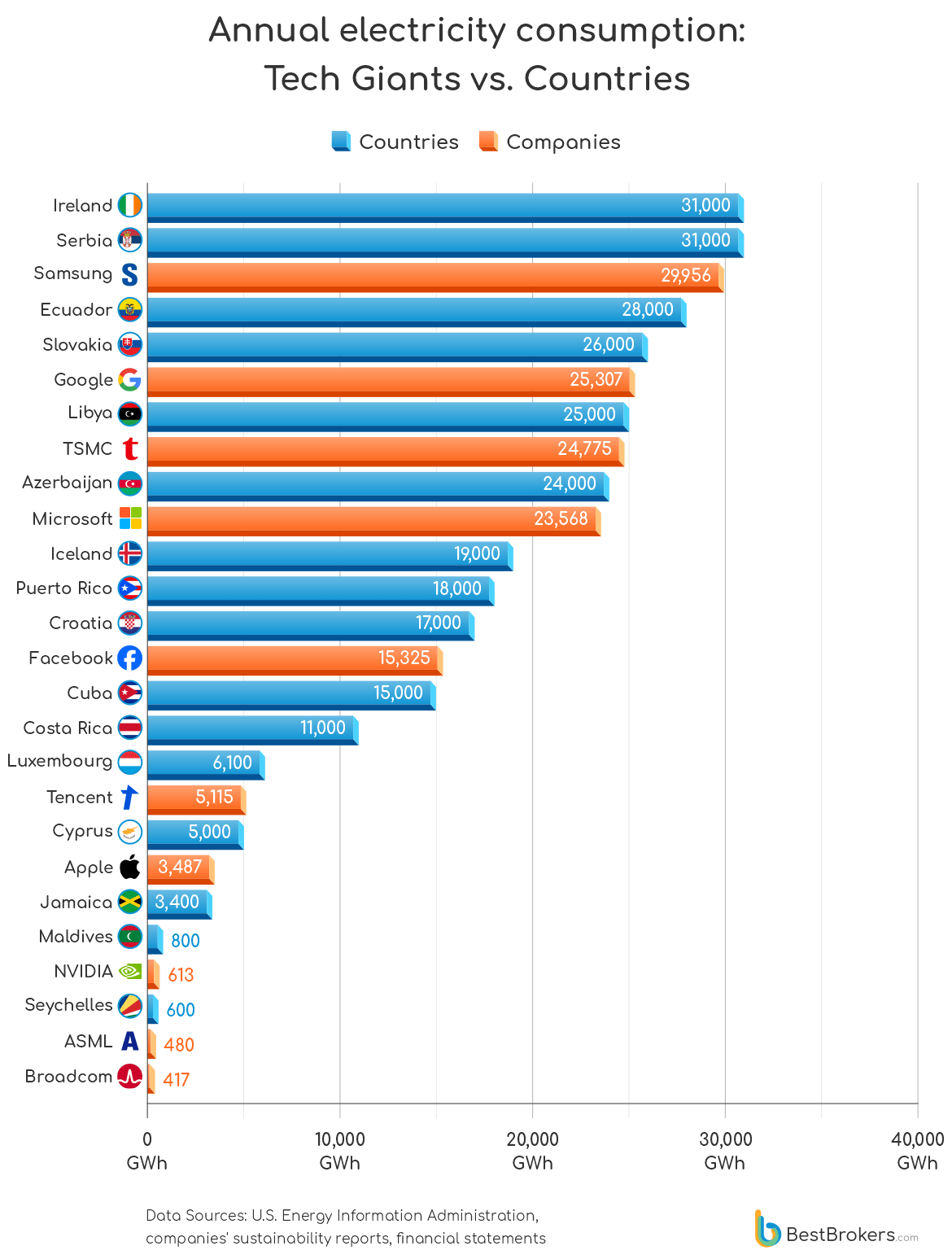
Power consumption for the ten largest global technology companies outpace entire nations.
Data centers are not necessarily bad, but they must be created with care and compassion for the community and ecosystem.
Self-Hosting
Federation is a foundational – yet still evolving –computing concept that enables services that are shared across multiple autonomous servers. In practice, this means that no one person can be the sole owner – anyone can host their own version of the service at any time.
By decentralizing the ownership of software, we can ensure no one has unilateral control. The Fediverse – or a federation of social networks – communicate using a standard protocol that allow them to work together while maintaining their individuality.

By leveraging the same cloud technologies, anyone has the ability to host their own services. Linux, Docker and all of the necessary software are open-source, available for free to anyone. These softwares are developed by open communities to further both personal and professional interests – like security, privacy and convenience.
Self-hosting is the practice of maintaining a privately owned server that is entirely within your control, instead of a third-party administrator. When running your own cloud server, you have the power – and responsibility – to act as an infrastructure, platform and software provider.
The growing momentum of cloud-based technology has made it easier than ever to host a server on your own personal hardware – even from home. The ascent of free and open-source software has created alternative to many of the web-based services – like remote storage, password managers, media streaming and an office suite.
 |
 |
There are many benefits to hosting your own server – like control and cost-savings because you don't rely on third-parties to administer your services. As a result, the responsibility to maintain infrastructure falls squarely on you – including hardware, security, and legal compliance.
While this can seem daunting, there is no better way to start than by trying for yourself. In a world that rapidly favors the digital, hosting your own server can teach you invaluable skills. Growing communities – supported by hobbyists, developers and corporations alike – help support each other and the software.
Getting Started
This page will act as a guide through the five books that make up this lesson. We will be exploring how to self-host your own server from home using Do-It-Yourself guides paired with educational resources exploring the history of computing. Along the way, we will critically reflect on what it means for our communities to host your own server.
0. Background
info
Table of Contents
|
Flag |
Before getting started, we should know what we're building. Running your own server is an excellent avenue to explore what it means to think like a designer and a developer. By taking ownership of our own digital security and privacy, we can help protect our families and communities.
1. Hardware
host
Table of Contents
|
Host |
Now that we understand our hardware requirements, we need to find a machine that supports them. We can create an open-source server using consumer hardware. Finally, there are some firmware configuration we should check before installing an operating system.
2. Software
terminal
Table of Contents
| Terminal |
We need to install Debian Linux onto our computer to form a foundation. We will use Docker to create secure, self-contained "virtual operating systems" that are easy to monitor and keep up-to-date. Importantly, we need to create a backup solution and setup remote access for our server.
3. Services
cloud_circle
Table of Contents
| Cloud |
Through Portainer, an intuitive interface for installing Docker services through a browser. We will be using a simple structured syntax known as Docker Compose to pop-up services from pre-built images.
4. Monitoring & Maintenance
build_circle
Table of Contents
| Build |
When running your own server, it's important to have ways to monitor your system and perform any required maintenance. This server will always be operating which makes it even more important to take our system apart to remove dust and dirt.
5. World Wide Web
public
Table of Contents
| Language |
We will configure our local network through our router to prepare for connection. We will use SWAG, a community-driven project to assist everyday people with creating a secure, self-hosted server. This solution uses a reverse proxy server to route traffic from a domain address to your hosted services. Finally, we will configure your router to connect your server to the internet.
Background
Many people know how to install a computer program, but wouldn’t even know where to begin if asked how the cloud works. Computers and their networks have been intentionally designed to be abstract – masking inner depths though a shared common language. These systems are a collective of parts working towards a shared desired outcome.

We leave a mark on the spaces left in our care and our personal decisions have reverberating effects that can be felt by others. When we create digital spaces, we must not forget the effect we have on our physical world – from the server in our garage to the data center down the street.
As we increasingly rely on the Cloud (or digital services hosted on someone else's computer), we must consider how this affects our personal privacy and security. The “Cloud” has taken control over the way corporations handle digital infrastructure. We have the right to control our digital ecosystem.
cloudWhat is the Cloud?
By 2025, an estimated 96% of corporations will rely on it – with a majority of data stored outside their business. Everyday consumers have been forced into the “Cloud” alongside them. But, what does this mean and how does it work?
Open-source software solutions can put us back in control of our digital experiences. By joining these open collaborative communities, we can add diverse voices throughout their growth process.
Learning Objectives
Anyone can learn to host their own server, but there are questions we need to ask ourselves before we do. How does power translate into responsibility?
|
Hardware |
Practical Be able to assess computer hardware components, install a working operating system and host a simple web server using open-source cloud computing technologies.
|
| Engineering |
Technical Understand the historical context, significance, and potential applications for cloud computing.
|
| Diversity_1 |
Social Explore the role that cloud computing has on mediating the relationships between people, places, communities, and “Technology”.
|
| Psychology |
Personal Critically analyze and assess your relationship with "Technology" and the vulnerabilities that can arise through reliance on them.
|
Before you make the decision to build a server, it may be helpful to learn more about me – the author.
What You'll Need
Aside from curiosity and hardware, you will need to create the space for reflection – about yourself and your relation to others. While you don't need to know how to write code, you must be comfortable thinking critically and logically. Confidently communicating roadblocks will be a strength and help you succeed.
As for hardware requirements, you can fulfill each at various price points, including free and low-cost options where available.
|
Desktop_windows |
Computer $50 – $1500
You will need computer hardware to host your server. This can be anything from a Raspberry Pi to a dedicated tower server, new or refurbished. Create a budget server and upgrade it as the need arises.
|
| cable |
Accessories $0 – $300
You will need a display, mouse and keyboard to interact with your computer, as well as cables and a USB flash drive.
|
| language |
Internet Service $30+/month
You will need internet access for your home server. Preferably, it is a hardwired internet connection – such as cable or fiber – as opposed to wireless – like satellite.
|
| Router |
Router $50 – $150
You will need a router that has Port Forwarding so it can forward traffic from the router to your home server. While not required, Dynamic DNS allows you to connect to your server without purchasing a domain name.
|
| Vpn_lock |
VPN Provider Free to $9+/month
A Virtual Private Network provider is an excellent way to maintain privacy and anonymity on the internet. While self-hosting services, they can hide personal information like what you're downloading or what websites you're accessing.
|
| Domain_verification |
Domain Name Free – $20,000
Accessing our server over the internet will generally require a domain name – such as example.com – and there is a wide price variability.
|
Before you commit yourself to this project, take this opportunity to explore everything you'll need to follow along. It's also important to reflect on how you will approach this learning experience.
Format
"Your Personal Cloud" will be a five-part series, divided into five books through this digital repository. These will follow a book metaphor with chapters and pages, progressively leading the way through making your own server.
This will not be just about how to do it, but also a reflection of how and why we arrived where we are. When we take back responsibility for our digital selves, we also gain the power and community to shape the digital world. Your perspective is vital for creating equitable technologies. Together, we can learn how to talk back and forge a new relationship with technology.
This is a self-led learning experience geared towards personal reflection on your own time and in your own space. Each book will contain do-it-yourself guides that progressively build on the last, standing as tangible milestones for your progress. We will explore why computers came to be, how we first connected them and what that means for global communities as we continue forward together.
These resources can be exported for your own personal archive.
These books will provide quick links to community-crafted resources – like Wikipedia – to help place ideas within larger concepts. Links within the text to academic, corporate and community resources will attempt to lend weight to the claims. Illustrations, digrams and visual resources are heavily leveraged to express and communicate abstract concepts.
A Project Notebook is offered alongside these lessons to keep track of technical notes, as well as to provide a central space for reflection and brainstorming. This can be printed – or downloaded as a form-fillable PDF – to act as a reference throughout all five books.
Process
We will be the same techniques and technologies used by many companies to host their own websites and cloud services. Created through community-powered projects, these technologies are robust enough for corporations while still accessible to someone looking to host a small home server.
All of the software you will need is offered free-of-charge by the original developers and can be downloaded from their servers.
|
Group_work |
This community-maintained Linux operating system is used to power many corporate machines.
|
| Group_work |
This open-source software can quickly setup secure "containers" – or applications running within their own isolated "virtual operating system".
|
| Group_work |
This community-supported application makes it easy to create and destroy Docker containers from your web browser through an intuitive graphical interface.
|
| Group_work |
This open-source software is a web server that powers a large portion of the modern Internet and offers tools for securely connecting self-hosted applications to the World Wide Web for access remotely.
|
Once the foundation has been laid, there are a wide gamut of open-source applications that can be self-hosted on your server. These provide services ranging from cloud office suites to personal media management. We dedicate a book to each unique service, providing a more in-depth examination of the project, it's purpose and how to install it.
Outcome
You will be create a personal home server using available hardware – such as a Raspberry Pi single-board computer or a refurbished desktop computer. This will host a basic website that is available at a domain name that you own.
Installation will require physical access to a monitor and keyboard, but the server will be setup for remote desktop and command line access. This can be available only through your home network or using a browser-based web application to access them while away from home.
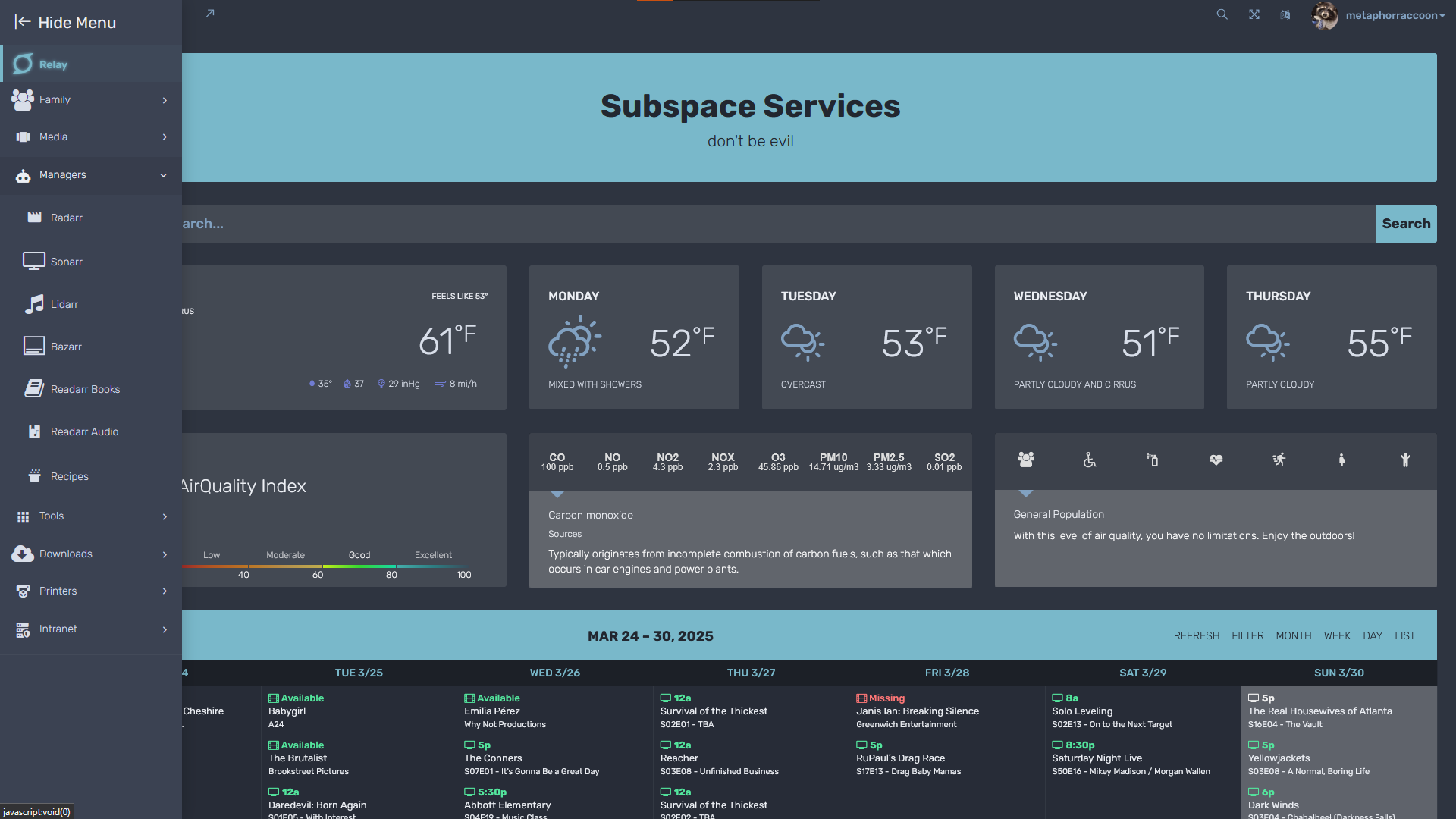
Many self-hosted services offer modern, responsive applications that you control through your browser or platform-specific software. Organizr enables you to create a personalized homepage to keeps your services in one place – on desktop and mobile.
Understanding The Requirements
When deciding on what hardware you need for your server, you need to know what you're going to use it for.
Ourselves
When we approach technology projects – either as an individual or part of a larger community – there are many things we need to take into account. There is one domain that has the potential to be overlooked in the grand scheme of things, but it is perhaps the most foundational essence of creation:
Who am I and how do I relate?
Our individuality makes it mark through our communities – friends, family, neighbors. How we envision ourselves within technology informs how we will approach not only the problem at hand, but the ways we navigate ourselves. We cannot build equitable systems by ourselves through nothing but isolation and grit.
By grounding ourselves within this time and space, we can build relationships outside of ourselves. Our continued growth – and our shifting place with our community – depends on the moments we take to reflect. We connect ourselves to something greater.
Do you already know that your existence — who and how you are — is in and of itself a contribution to the people and place around you? Not after or because you do some particular thing, but simply the miracle of your life. And that the people around you, and the place(s), have contributions as well? Do you understand that your quality of life and your survival are tied to how authentic and generous the connections are between you and the people and place you live with and in?
— adrienne maree brown
Who Am I?
- Objective: In this assignment, learners will
Create a summary document appraising the skills and values they bring to teaching
Identify potential barriers to becoming a successful instructor
Analyze their positionality in relation to teaching in an information setting
Reflection is a very useful learning process, though it is also one of the most difficult. For many of us, it feels like there simply isn't time to step back and think--about some incident at the workplace, where we want to be instead of where we are, how we got here, what steps we should take next. Chances are, you could make time, but you're not prioritizing it: reflection means not only looking at things that went well, but also things that perhaps could have gone differently and that can be very uncomfortable.
Well, welcome to the discomfort zone: you're going to be reflecting this quarter. Ultimately, the question you're going to be reflecting on is "who do I want to be as a teacher?" but we're going to take it in stages. - What you bring also includes looking at your positionality: how do various aspects of your identity influence how you see, and as a teacher, how you shape your world? There's a good graphic overview of the concepts of intersectionality, positionality, and privilege here.
- You'll no doubt come up with some pinch points/barriers in your reflection, as well: what's keeping you from being who you want to be as a teacher? That could range from lack of opportunity to a list of specific skills you want to learn, to a more vague feeling of dread when you think about talking to a group of people. Identifying those challenges is important, as those challenges can become opportunities to learn, grow, and move forward.
- What you bring to teaching/instruction planning--skills, values, hopes
What is your positionality in terms of teaching? What parts of your identity influence your work?
Perceived obstacles to who you want to be as a teacher--and what opportunities you want to see in this course that can help remove those barriers - Technology can feel exclusionary
- Personal skills
- We learn that factors beyond our control determine the quality of our lives—something as random as which skin, gender, sexuality, ability, nation, or belief system we are born into sets a path for survival and quality of life.
- there's no "right" answer here, as you each bring something different to this endeavor, and have varying goals.
- We learn to be quiet, polite, indirect, and submissive, not to disturb the status quo.
- In the United States specifically, though I see this most places I travel, we learn that we only have value if we can produce—only then do we earn food, home, health care, education.
- Who are you? Have you asked yourself recently? What is it that you do? Who do you do it for? What drives you?
- Curiosity
- intentional
- adaptation: a change in a plant or animal that makes it better able to live ina particular place or situation; the process of changing to fit some purpose or situation: the process of adapting intention: the thing that you plan to do or achieve: an aim or purpose
- Radical optimism
- Can you appreciate yourself, so that you can appreciate others and their own complex relationship with reality.
- Do you know where you are in your journey and have you taken time to appreciate the journey? Before you can see and appreciate someone else's progress, you must first acknowledge that you yourself have changed and embrace it.
What Am I Doing?
- Winner, L. (2004). “Technologies as forms of life.” In Kaplan, D M. (Ed.) Readings in the Philosophy of Technology. Rowman & Littlefield, pp. 103-113. Winner - Technologies as forms of life.pdf
- Running a server can take a wide array of technical and design skills, but it can also take curiousity and a compassion.
- We are each capable of so many things when given the time and space to work through understanding our relationship with something new. Something might seem scary until you try it out and realize the similarities to something you're already doing or already know.
- Thinking skills
- Critical thinking
- Logical thinking : if this then that. These are the core fundamentals of the way computers think.
- Basic understanding of how to use a computer and ideally install software.
- Know how to install a computer networking device, such as plug in a computer to a router.
- For any server hardware modifications, you might need to be able to change a graphics card or install a hard drive.
- Troubleshooting problems : how to systematically work through a problem to know which avenues you can explore to attempt a fix. If the Internet isn't working, is it on just one computer or is it every device? Are your neighbors Internet out?
- Modular thinking
- Systems thinking
- Designer
- Developer
- Administrator
- Steward
- Custodian
- What is the difference between a designer and developer? A developer works on the foundations that create something while designers look into the ways these foundations work as part of a system. Many people perform both roles, often without even realizing it. Baking vs decorating a cake.
How Do I Navigate?
- SAMHSA’s Concept of Trauma and Guidance for a Trauma-Informed Approach (2014) (p. 10-11 “Six Key Principles of a Trauma-Informed Approach”)
- Tuck, E., & Yang, K. W. (2012). Decolonization is not a metaphor. Decolonization: Indigeneity, Education & Society, (1), Article 1. https://jps.library.utoronto.ca/index.php/des/article/view/18630
- Arellano Douglas, Veronica. (2020). "Moving from Critical Assessment to Assessment as Care." Communications in Information Literacy, 14 (1), 46-65. UW Catalog
- Less on point. More on purpose.
- How do I handle change, especially emergent change?
- We learn to disrespect Indigenous and direct ties to land.
- What you pay attention to grows. emergent strategy
- We learn to compete with each other in a scarcity-based economy that denies and destroys the abundant world we actually live in.
- We learn to deny our longings and our skills, and to do work that occupies our hours without inspiring our greatness.
- Perhaps the most egregious thing we are taught is that we should just be really good at what’s already possible, to leave the impossible alone.
- Growth mindset. We will make mistakes but that is how we learn.
- Transformation doesn’t happen in a linear way, at least not one we can always track. It happens in cycles, convergences, explosions. If we release the framework of failure, we can realize that we are in iterative cycles, and we can keep asking ourselves—how do I learn from this?
- A fractal is a never-ending pattern. Fractals are infinitely complex patterns that are self-similar across different scales. They are created by repeating a simple process over and over in an ongoing feedback loop. Emergent strategy
- Never a failure, always a lesson.*° emergency strategy
- Change is constant. (Be like water). Emergent strategy
- It's okay to try again from scratch
- Assessing your limits and knowing when to step away. this may be frustrating and you may be discouraged, but we can always approach again later
- We learn as children to swallow our tears and any other inconvenient emotions, and as adults that translates into working through red flags, value differences, pain, and exhaustion.
- We learn that tests and deadlines are the reasons to take action. This puts those with good short-term memories and a positive response to pressure in leadership positions, leading to urgency-based thinking, regardless of the circumstance.
- We learn that the natural world is to be manicured, controlled, or pillaged to support our consumerist lives. Even the natural lives of our bodies get medicated, pathologized, shaved or improved upon with cosmetic adjustments.
- Do you let yourself be yourself, or is that something just below the mask you share with the world?
How Do I Communicate?
- It troubleshooting for users
- Communicating needs
- Transparency and accountability
- Ant societies function through individual ants acting collectively in accord with simple, local information to carry on all of their survival activities. Every ant relies on the work of others in producing their own work. Cooperative work. Collective. Sustainability. Emergent strategy
- Decentralization: the dispersion or distribution of functions or powers, the delegation of power.
- Interdependence is mutual dependence between things. If you study biology, you'll discover that there is a great deal of interdependence between plants and animals. “Inter-” means “between,” so interdependence is dependence between things, the quality or condition of being interdependent, or mutually reliant, on each other.
- Starlings. The synchronized movement patterns of a starling flock is also known as a murmuration. Guided by simple rules, starling murmurations can react to their environment as a group without a central leader orchestrating their choices; in any instant, any part of the flock can transform the movement of the whole flock. Collective leadership/partnership. Adaptability.
- Similarly, we learn our organizations are only as successful as our fundraising results, whether the community impact is powerful or not.
- We learn to bond through gossip, venting, and destroying, rather than cultivating solutions together.
- We learn to manipulate each other and sell things to each other, rather than learning to collaborate and evolve together.
- How to design an information query
- Getting support on a forum or within a community
- How to ask questions
- There is a conversation in the room that only these people at this moment can have.*® Find it. Emergent strategy
- Trust the People. (If you trust the people, they become trustworthy) .* Emergent stategy
- This is a space where everyone deserves to have their voices and needs heard. Open source software is intended to get a democratic space
- Your choices affect your community and your ecosystem
- Empathy
- Healing
- Building trust
- Ask for and receive what you need
- Love may seem silly. But it is the root of compassion and care. It leads to passion for what we do and strive to support those we care for. While this is leveraged in the creation of technology, it is
- Move at the speed of trust. Focus on critical connections more than critical mass—build the resilience by building the relationships. Emergent strategy
Computer
What you're planning on doing with your server will dictate the hardware you'll need to fulfill those requirements.
|
Raspberry Pi 4 |
 Desktop Computer Desktop Computer |
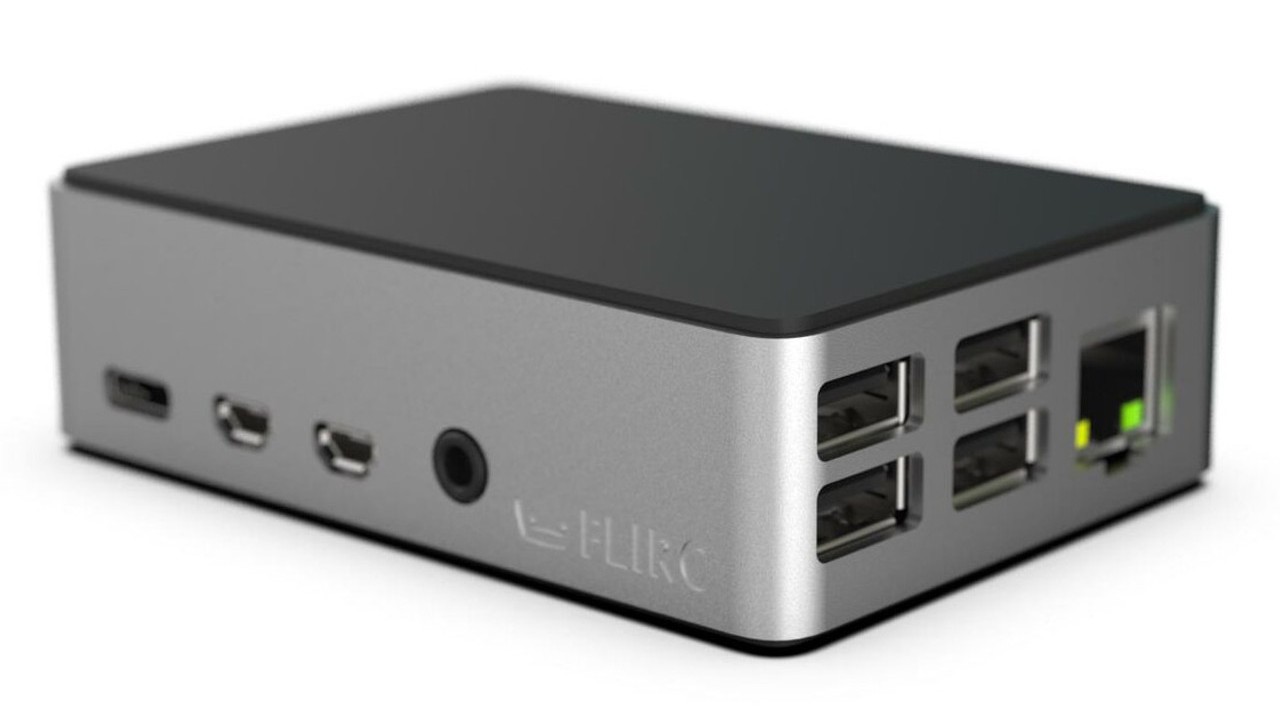
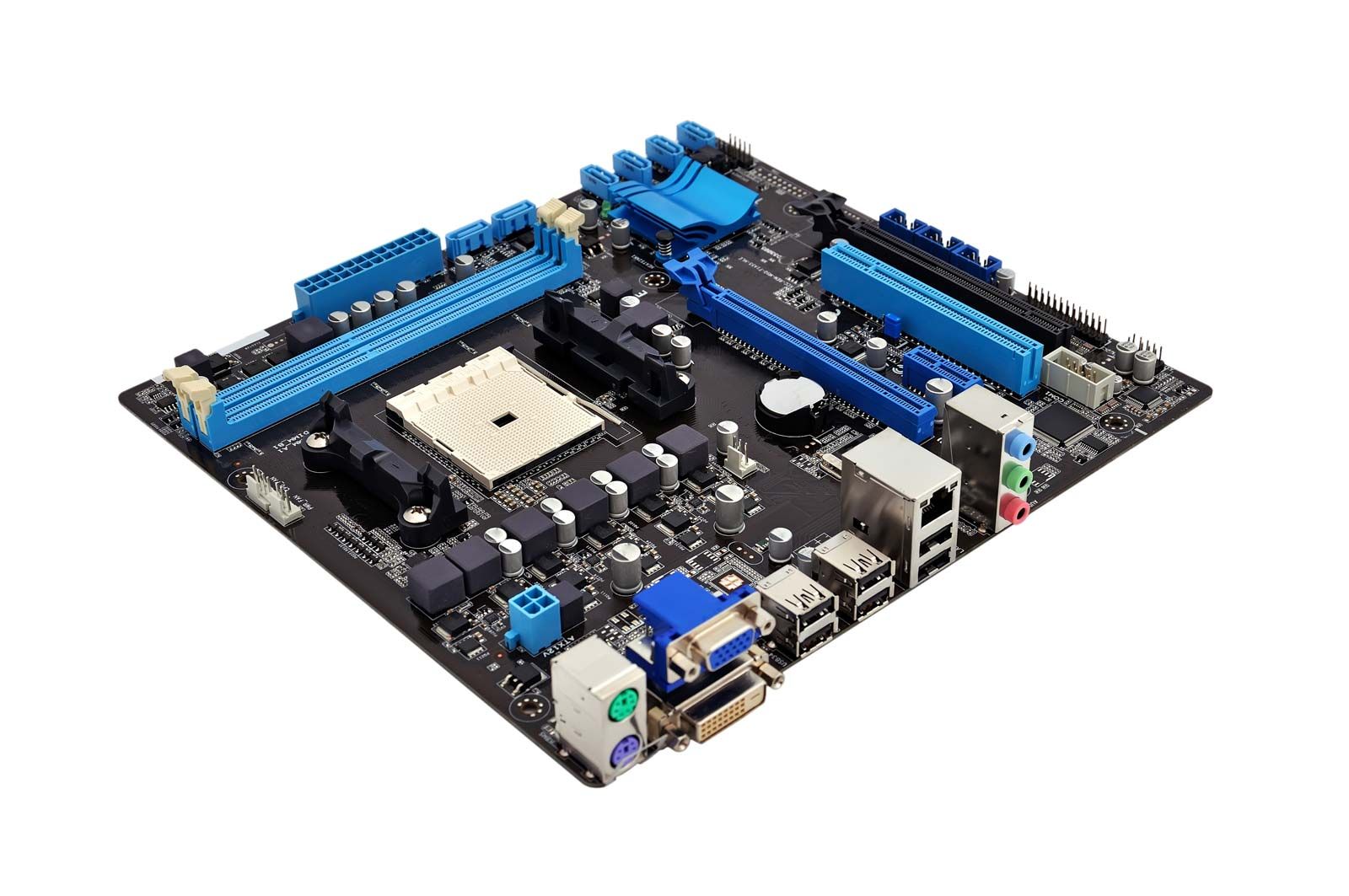
When you're running one or two services, a Raspberry Pi would probably suffice, while running your own personal cloud services may require a refurbished desktop computer.
Running a media server may require a faster processor, a decent graphics card and adequate storage space for digital media. We provide "Quick-Start" examples to help you make up your mind.
Core Processor
Choosing the type of main processor you will use for your server is a core decision to building a server.
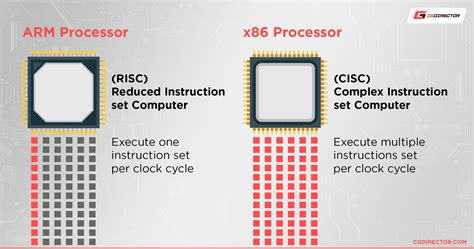
There are two primary families of processors designed and developed to meet specific criteria:
| Desktop_windows |
x86 Processor Traditional computers – such as desktops, laptops and servers – use an evolution of the same processors first developed in the 1970s. These x86 processors are named after the Intel 8086 that the architecture is based on.
Traditional x86 processors utilize a Complex Instruction Set that is more equipped to juggle multiple tasks. They focus on sustained processing power and can handle a larger workload. Traditional computers come with active heat management – such as fans or liquid cooling.
These types of computers are great for hosting your own personal cloud with a variety of services, such as OwnCloud, Jellyfin, qBittorrent, or media procurement services.
|
| Mobile |
ARM Processor ARM (Advanced RISC Machine) is a new class of processors that are in the same family as the one that power your cellphone.
The Raspberry Pi – and other single-board computers – use this type of processor for their power efficiency. On the flip side, they can't juggle running multiple programs like an x86 processor. Without adding fans to cool them, these system-on-a-chip are susceptible to overheating.
These extremely cost-effective systems are great hosting a single service – such as a personal website, BitWarden, Home Assistant or Grocy. |
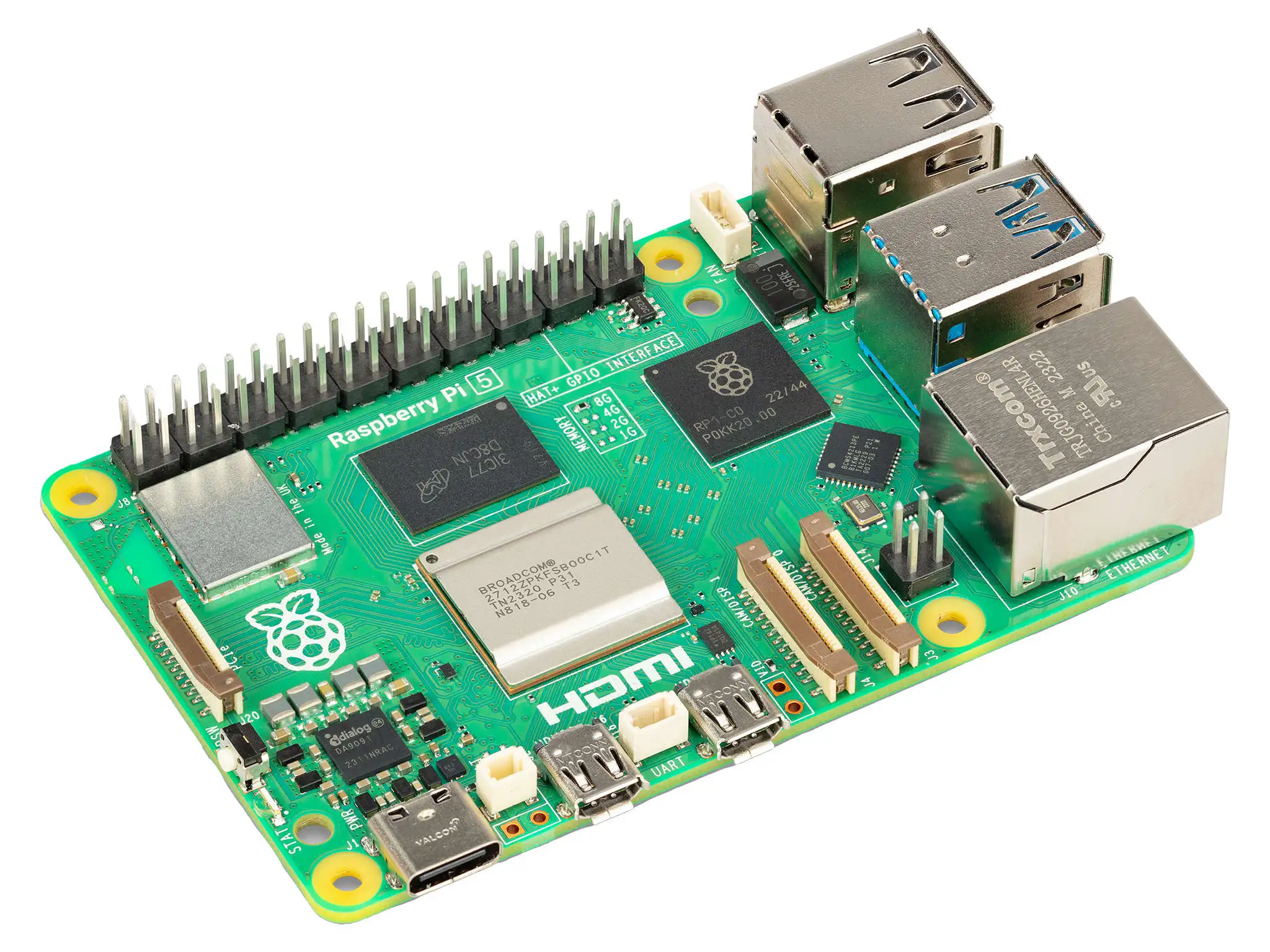
|
Recommended Specs |
|
| Acute |
Released 2011 or newer |
| speed |
Speed 1.8GHz or higher |
Graphics Processor
When it comes operating a server, graphics cards can be leveraged by certain applications. Compared to computational processors, graphics cards have the ability to run many processes in parallel. This is a great advantage for image and video processing, as well as data analysis and number cruching.
Within modern computer systems, there are two classes of graphics processors.
| Memory |
Integrated Graphics Many modern processors come with graphics cards directly embedded into the processor. This provide enough power for basic operations – such as running a web browser or basic image editor.
Integrated graphics cards share hardware resources with the processor decreasing their overall power. They may not be robust enough for complex image or video processing tasks.
Modern desktop systems can be modified to add more graphical processing power. Most single-board computers – like the Raspberry Pi – cannot be modified to increase their graphic processing.
While Raspberry Pi computers are useful for small computational tasks, they can often lack the graphical processing necessary to do complex image processing tasks. These computers do not dedicated graphics processors and instead rely on a "system-on-a-chip" that shares graphical and computational power.
|
| Developer_board |
Dedicated Graphics Traditional computers have a powerful advantage here because they are so customizable. Thanks to the extensible PCI-e interface, additional graphics processor – or a graphics cards – with much more dedicated power can be installed.
Dedicated graphics cards have specialized cores that allow them to convert videos more efficiently than a CPU. In addition, they come with their own memory to lessen the strain on the rest of the computer system's hardware.
These can be helpful for tasks that deal with images and videos – such as Jellyfin processing a movie for streaming through a media server. |
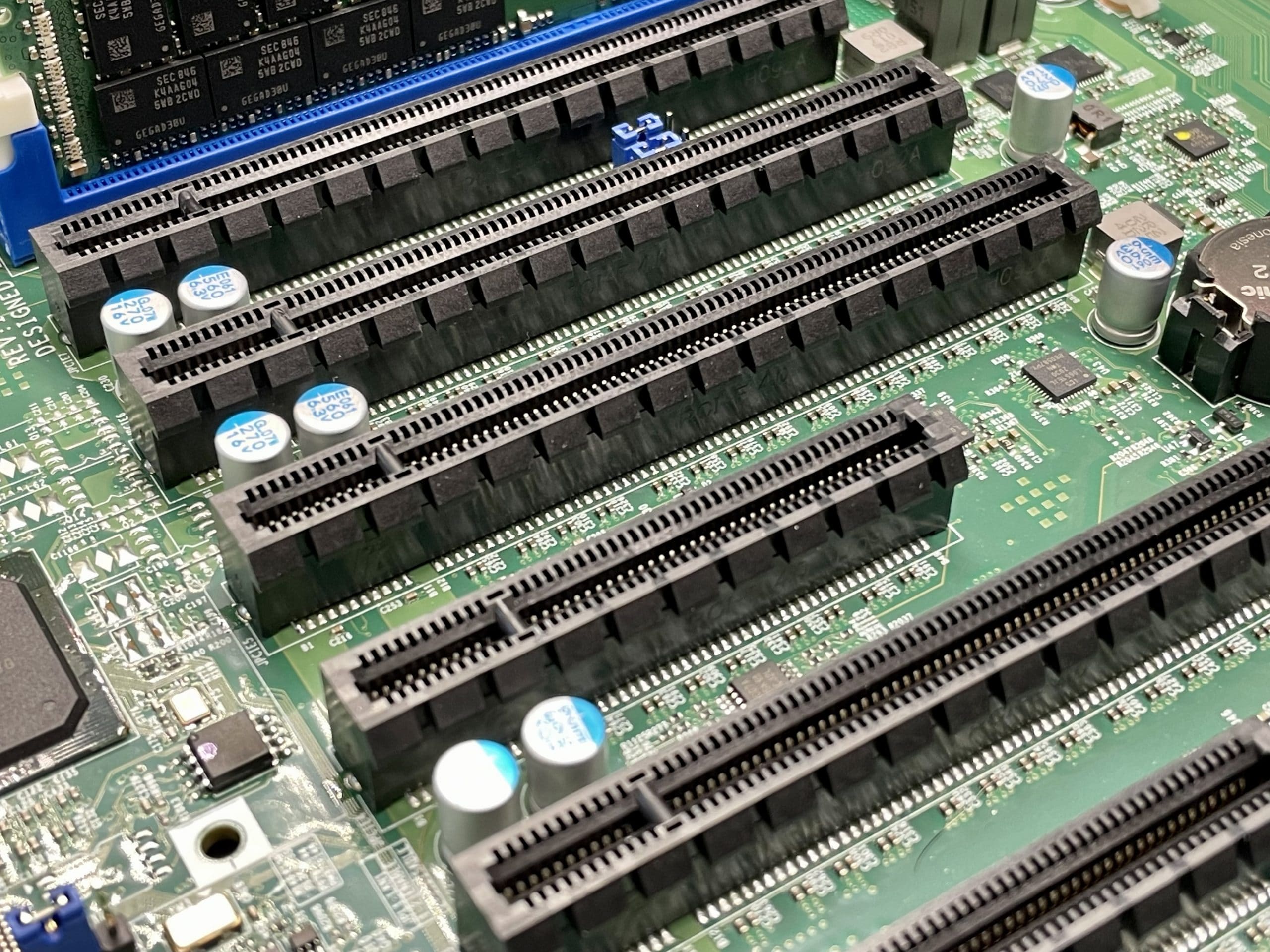
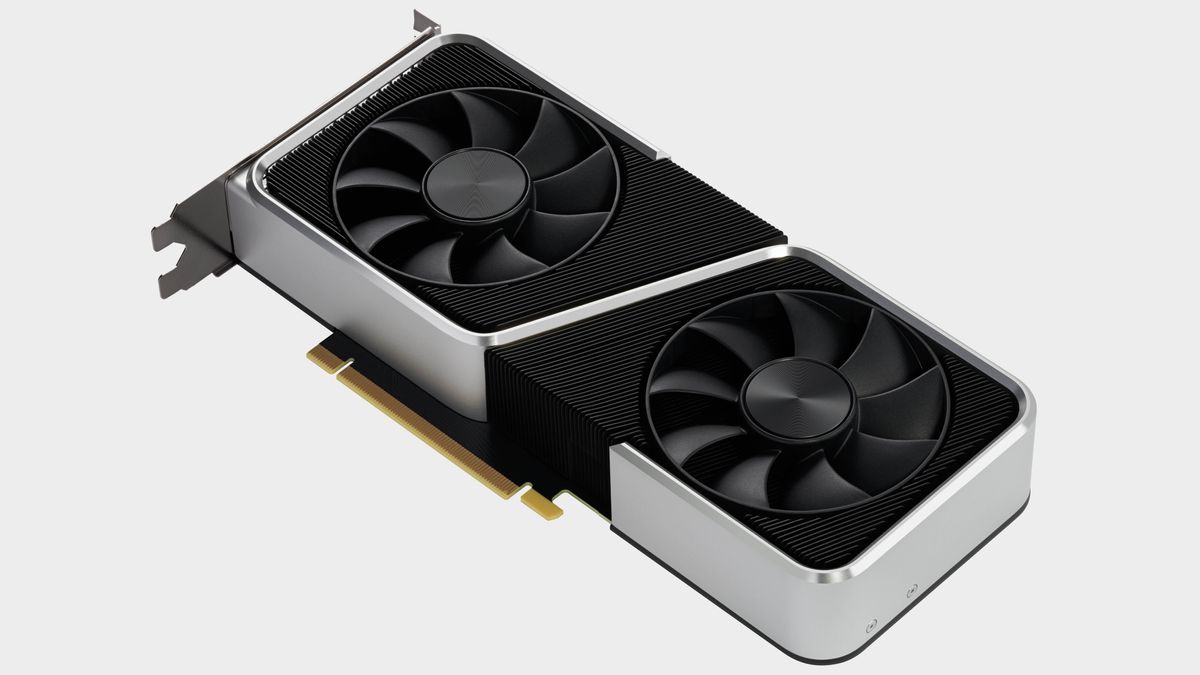
|
Recommended Specs |
|
| Acute |
Released 2016 or newer |
| Speed |
Processor Speed 1.0GHz or higher |
| Memory |
Memory Capacity 4GB or higher |
| Developer_board |
Expansion Interface PCI-e 3.0 or newer |
Memory
The amount and speed of Random Access Memory – or RAM – can affect the responsiveness of your server. Your server will need more memory when it needs to juggle multiple services at once.
| Memory |
Integrated Memory Single-board computers have memory that is built directly into the hardware board and cannot be upgraded after the initial purchase.
They often use a "low-powered" variant of memory called LPDDR that can decrease its overall speed and responsiveness during multitasking.
|
||
| Developer_board |
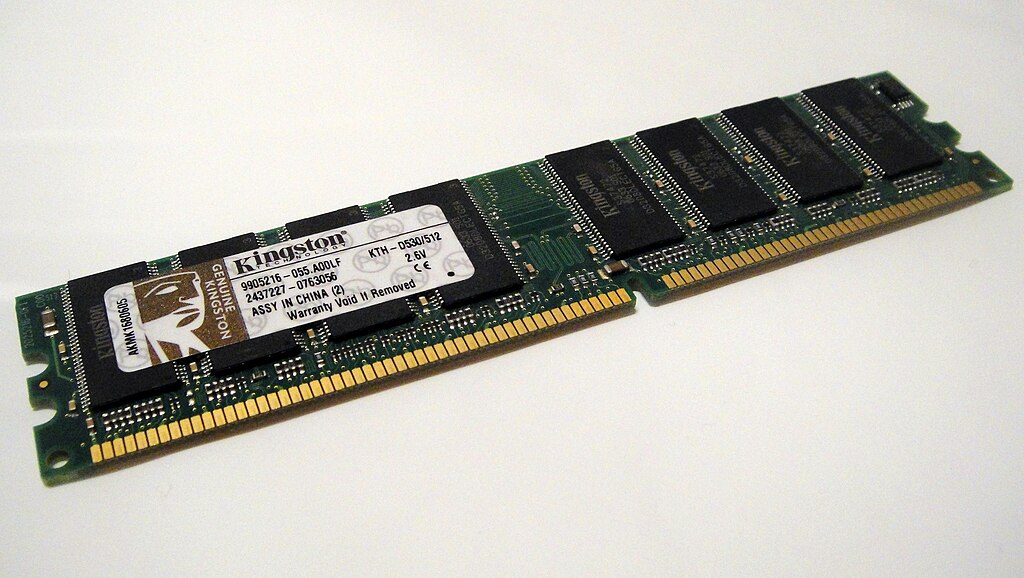
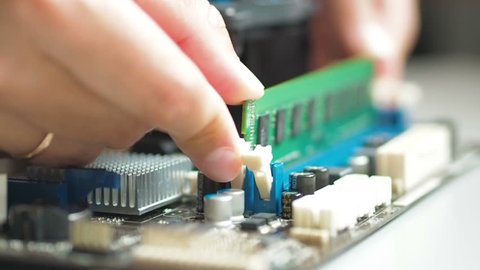
Extensible Memory Traditional computers use the DDR class of RAM that has been progressively updated since the 1990s – currently up to DDR5. Each successor is not backwards compatible, but provides sizable advancements over previous iterations. With these systems, memory can be upgraded by purchasing RAM modules of the same type and speed.
|
|
Recommended Specs |
|
| Memory |
Capacity 8GB or higher |
| Category |
Type DDR4 or newer |
Storage
There are three types of storage hardware that are employed to fulfill server needs:
| Hard_drive |
Platter Disks These are based on an older, well-tested technology originating in the 1950s. Modern hard disk drives commonly use the SATA protocol.
They are slower, but can hold up to 20TB of storage on each drive – making them great for longer-term multimedia or document storage. |
||||
| Hard_drive |
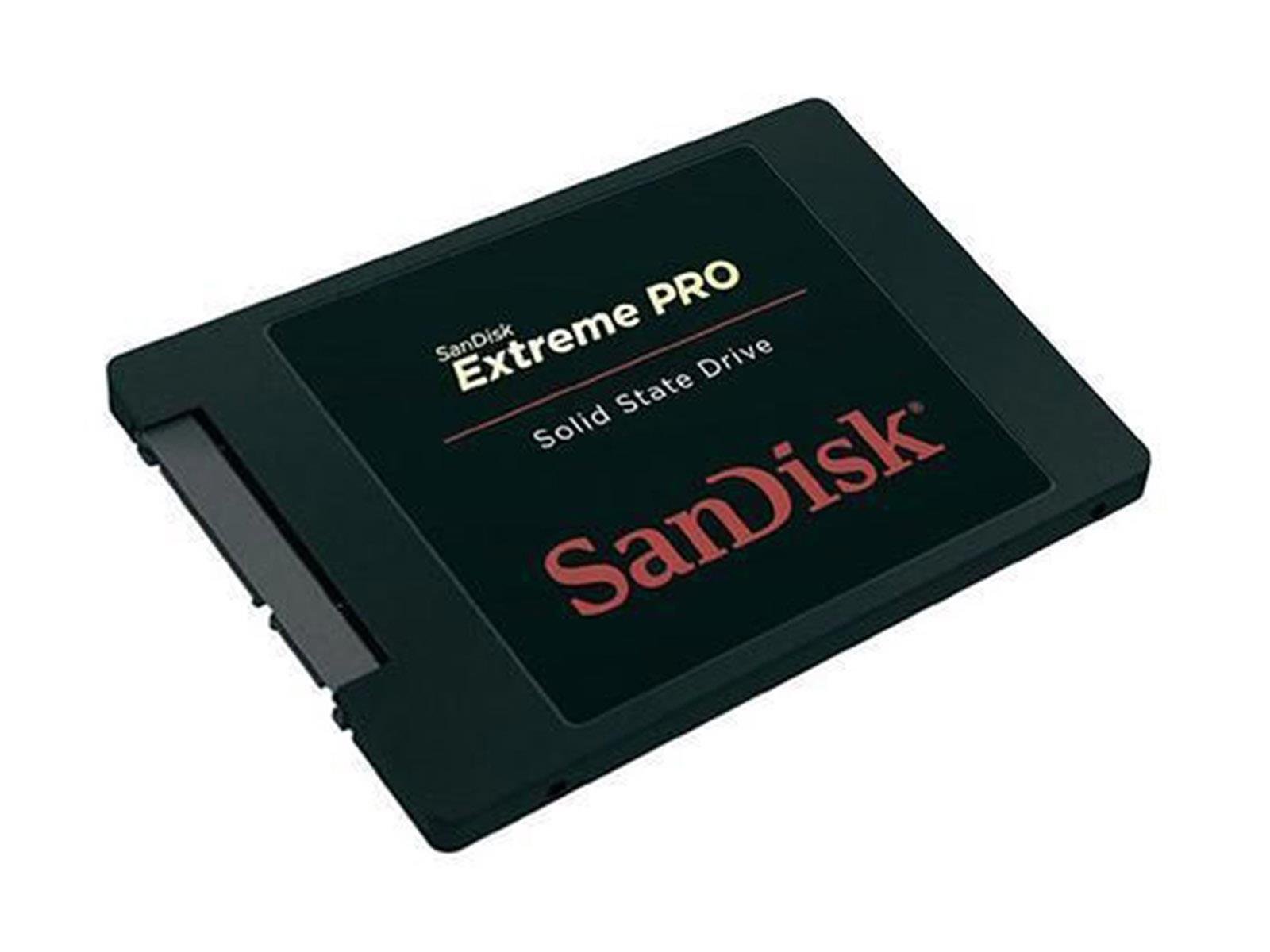
Solid State Disks These use the newer solid state memory standard popularized by the smart phones. SSDs are incredibly fast, but spacr comes at a premium.
These drives can use the SATA protocol like traditional hard drives, but they are increasingly available using an M.2 port. These "Non-Volatile Memory express" – or NVMe drives – transport data over the speedy PCIe interface.
Solid state drives, especially NVMe drives, are the best option for storing the operating system and other configuration files. When hosting a media server – such as Jellyfin, Audiobookshelf or Kavita – storing databases, metadata, and other cache files on an SSD can greatly improve the media server's responsiveness.
|
||||
| Hard_drive |
Flash Disks When using a Single-Board computer – such as the Raspberry Pi – the primary operating system is typically stored on a MicroSD flashcard.
These use classification systems to gauge their overall speed and performance. These are signified by symbols on the SD card and it's packaging. They are used to ensure performance with certain devices – like cameras or cell phones.
Two common certification are:
For the best performance, Raspberry Pi recommends a Speed Class of C10 – or a UHS Speed Class of U1. These provide a guaranteed transfer speed of 10MB/second. |
 Platter Hard Disk Drive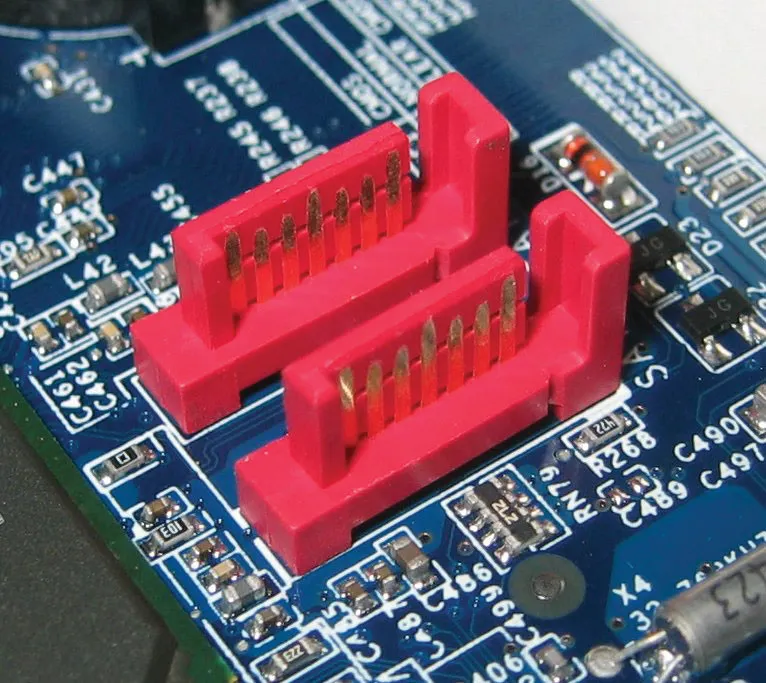
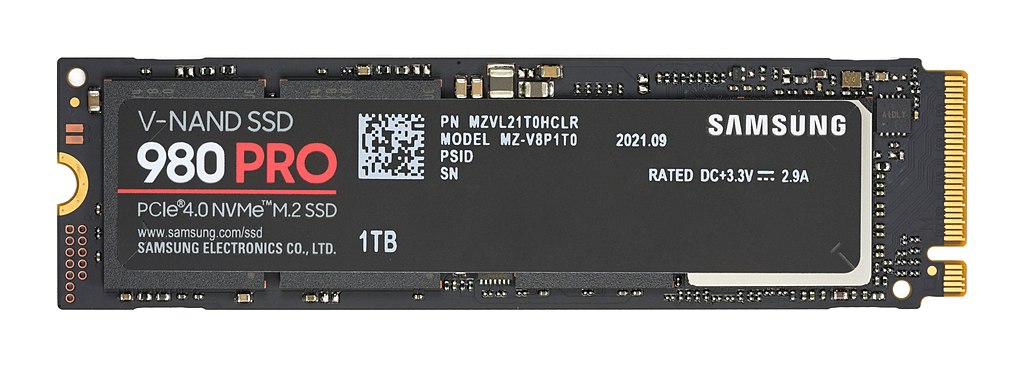
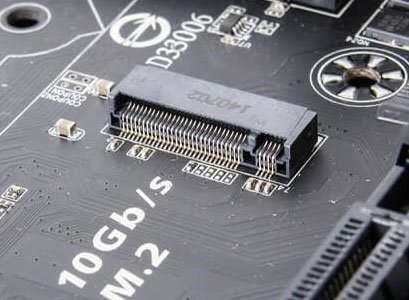
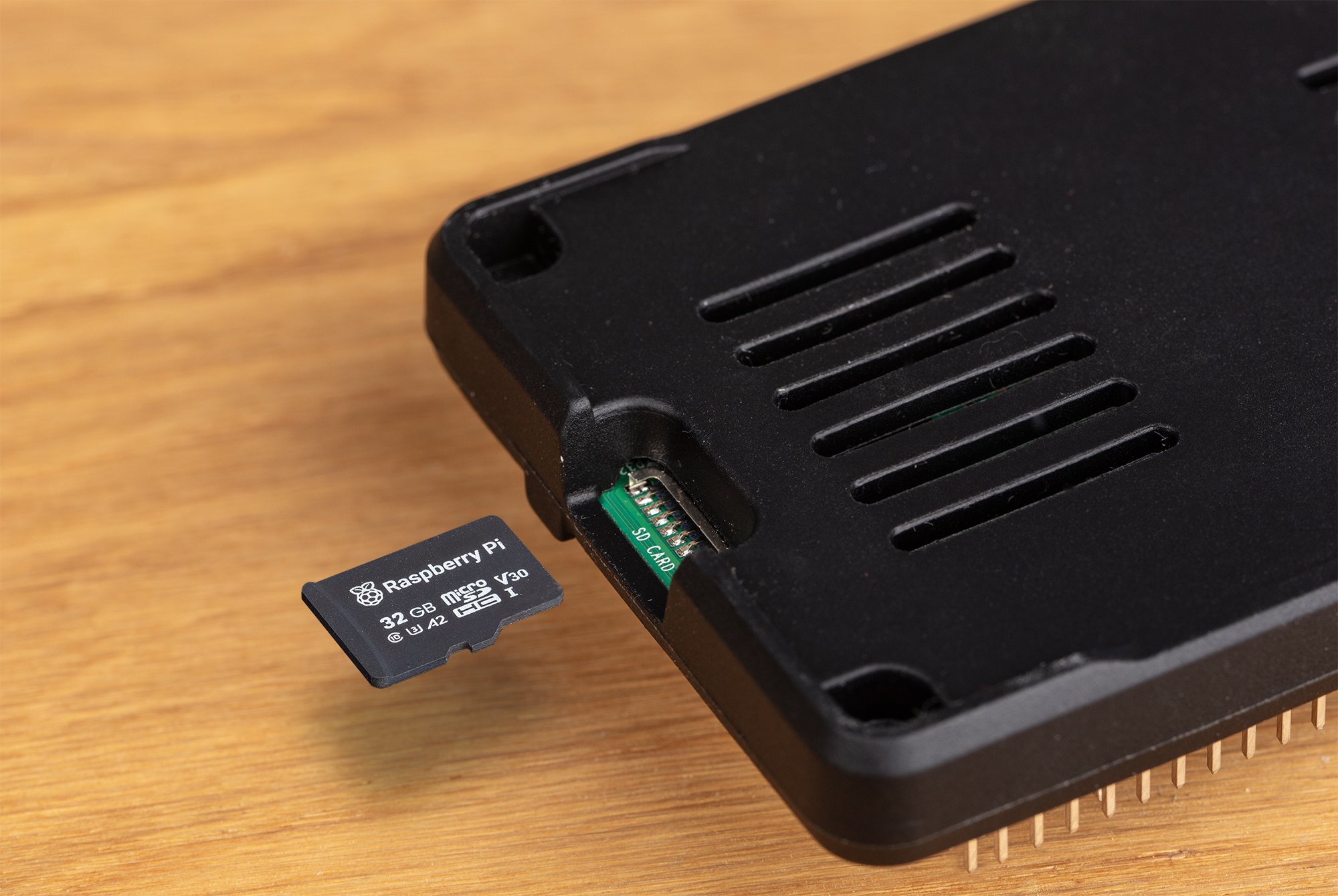
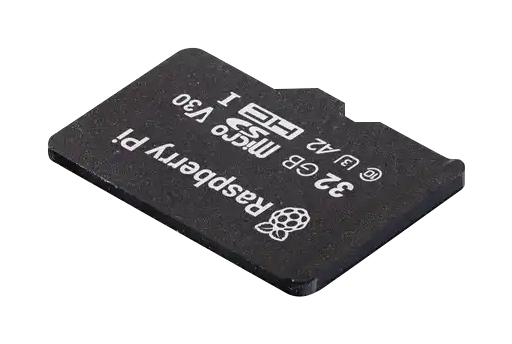


Graph/table of different speeds SD, HDD, SSD, nvme, ram
| Type | Read Speed | Write Speed | Capacity |
| MicroSD C1 | 10 — 100 MB/s | 10 — 100 MB/s | 16GB — 1TB |
| MicroSD U1 | 10 — 100 MB/s | 10 — 100 MB/s | 16GB — 1TB |
| SATA HDD | 80 — 160 MB/s | 80 — 160 MB/s | 250GB — 32TB |
| SATA SSD | 200 — 600 MB/s | 200 – 600 MB/s | 250GB — 20TB |
| NVMe SSD | 5000 MB/s | 6000 MB/s | 120GB — 4TB |
| RAM | 40 GB/s | 40 GB/s | 4GB — 512GB |
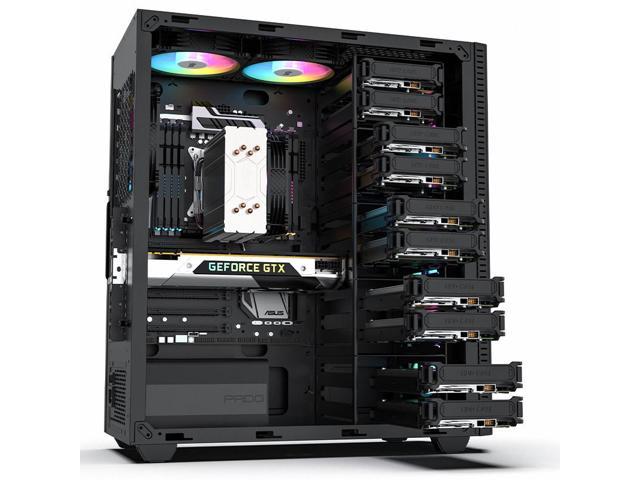
Depending on the form factor, there is a variability in both the types and quantity of storage connectors. Compact PCs often support one or two drives, while a full computer case can often accommodate more.
Each of these storage drive technologies are also available to be used as an external disk over a USB, Thunderbolt or eSata connection. This expands storage options beyond what will fit inside of the computer case. However, external drives can create a "bottleneck" where speed and efficiency become limited, so they should not be used for system files.
When hosting multiple services from a single server – such as a personal Jellyfin media server and a public WordPress site – it can be advantageous to store each of their files on seperate storage drives. This has security benefits, as well as balances the load across multiple drives to avoid a bottleneck.
Similarly, storing sporadically accessed files – like your multimedia – on traditional platter drives allows them to conserve power by turning off hard disks that haven't been used recently.
|
Recommended Specs |
|
| Terminal |
Operating System SSD 150GB or greater, NVMe or SATA |
| Manufacturing |
Service Files SSD 150GB or greater, NVMe or SATA |
| Subscriptions |
Multimedia & Documents HDD 2TB or greater, SATA |
Connectivity
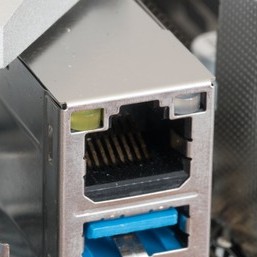
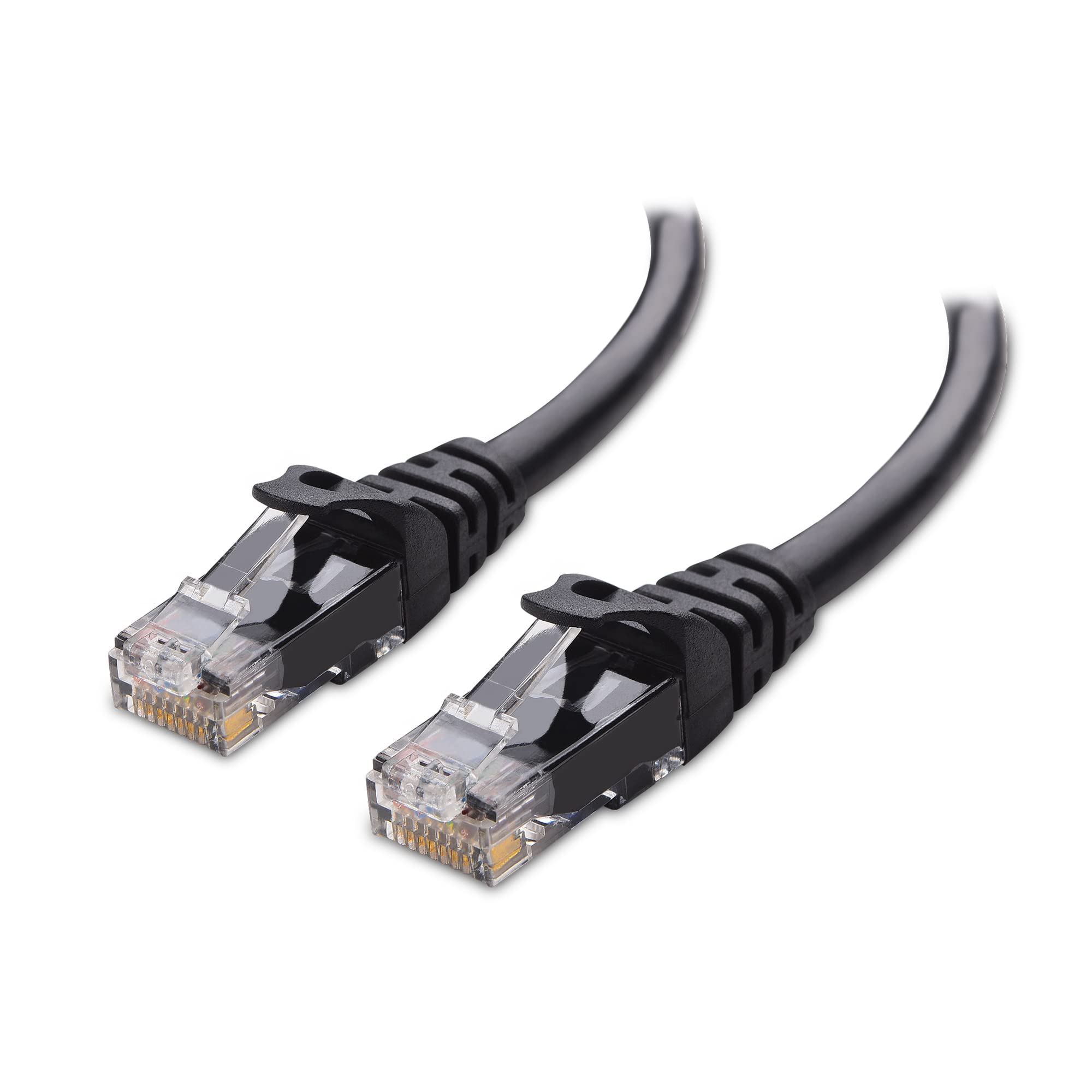
A network-connected server should be connected to your router with a hard-wired Cat6 Ethernet cable.
| Settings_ethernet |
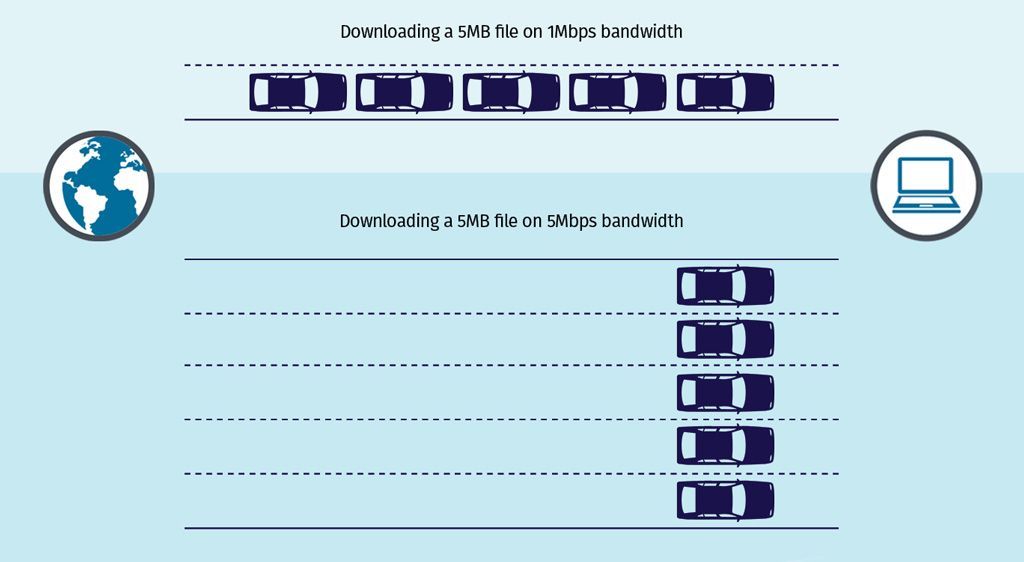
Wired Connection Your Network Interface should have a 1Gbit or preferably 2.5Gbit connection speed. This is the throughput available within your Local Area Network and is separate from your ISP speed.
Ethernet cables use a classification system to ensure speed and reliability over certain distances – such as Cat5, Cat6 or Cat8. When possible, using Cat6 Ethernet cables will provide reliable performance over short distances.
|
|||
| Wifi |
Wireless Connection Wi-Fi should be avoided while running a server where reliability is crucial. When not in use, disabling the wireless card improves security by decreases unintended means of access.
|
|||
| Bluetooth |
BlueTooth This can be used to connect smart devices to Home Assistant, but is not crucial for any server functions. When not in use, it should be completely disabled because BlueTooth hacking is a common avenue for exploitation when left on.
|
|||
| Usb |
External Wired Connections There are many protocols and connectors that can be used to attach additional peripherals – like USB, eSATA, Thunderbolt, USB 3.0, and FireWire.
These can be used to attach hardware peripherals to a computer through a physical, wired connection. Ranging from hard drive storage to a ZigBee adapter for smart home devices, external connectors are how you can expand your server outside of its case. |
Power
Operating a server requires electricity to power all of the running parts – from the server itself to the electronics that maintain your Internet connection or attach external storage disks. By choosing to self-host, we not only retain digital autonomy but can consider our effect on the ecosystems around us.
When paying your power bill, wattage is how we quantify how much energy is being used per second. The power draw of a device is measured over time – typically expressed as kilowatt-hours or kWh. Utility companies offer consistent access to power by the kilo-watt hour, generated from both renewable and consumable fossil fuels.
Energy can comes from many sources and some are harmful. Learn more about where your energy comes from.
Home electronics are made to work with standard power outlets and do not require much conscious planning – plug a device in and it just works. Despite this, electronics must have information about their power requirements right on them. This can help estimate how much an always-on computer costs to operate per payment cycle.
Power Consumption
Power Supply Units – or PSUs – provide electricity to individual components within a computer. These specify the wattage that the power supply can draw during a heavy work load. This is only maximum possible power draw and isn't an indication of how much power the computer will consume while idle.

Each component connected to the PSU will need to draw power in order to function and every computer has different parts. The exact amount fluctuates based on their workload and the function being performed – converting a video requires more power than inputting text into a text editor. An operating system manages power, putting idle parts to sleep – or a low-power mode that conserves electricity.
Servers can draw a lot of power at once and should be plugged directly into a wall socket, not a power strip or extension cable.
CPUs and GPUs generally require the most power, but parts designed for mobile devices are extremely efficient. By exploring the average power usage for computer components – both idle and under load –you can estimate how much power the server will consume over the course of a day.
Power Consumption in Watts
| Component |
Idle | Under Load |
| Motherboard | 15 | 25 — 100 |
| Desktop CPU | 10 — 30 | 75 – 250 |
| Desktop GPU | 10 — 50 | 200 – 500 |
| Mobile CPU |
5 — 15 |
15 — 65 |
| Mobile GPU | 10 — 100 | 35 — 150 |
| Hard Disk Drive | 5 | 5 — 15 |
| Solid State Drive | 1 | 1 — 5 |
| RAM module | 2 | 2 – 5 |
These numbers are the instantaneous power usage by the computer – measured in watts. These are a helpful baseline, but power draw will fluctuate. When not actively in use, a modern system might consume around 100W. Office tasks like browing the web or writing an email may require 250W, while a graphic-intensive video game could draw up to 800W.
Want a better idea? Try out pcpartpicker.com and add your exact components.
When connecting your server to the Internet, the modem and router will also consume electricity. While this may be a lot less than a server, that power still needs to be accounted for. These devices will also draw more power when under a heavy load – such as streaming multiple videos.
Graph comparison of device wattage
Power Consumption in Watts
| Device | Idle | Under Load |
| Raspberry Pi 5 | 3 | 3 — 7 |
| Laptop | 5 | 30 — 200 |
| Mini PC | 5 — 20 | 20 — 400 |
| Desktop PC | 35 — 100 | 150 — 300 |
| Workstation | 75 — 150 | 300 — 800 |
| Wi-Fi Router | 5 | 5 — 20 |
| Modem | 5 | 5 — 20 |
Want to be exact? Try out a digital power meter to find your exact energy usage.
Cost Estimates
Once we have a better idea how much energy we'll require – in the form of wattage – we can estimate how much power that will consume over the course of an entire day.
Don't want to do math? Try out this wattage calculator from EnergyBot.
You calculate this by multiplying the total wattage you estimated by the number of hours a day the server will be drawing power. This will be 24 hours per day. We now have our wattage per hour. Finally, we can divide this number by 1000 to achieve our kilowattage per hour.
E(kWh/day) = P(W) × t(h/day) / 1000(W/kW)
A 200 watt Mini PC will use 4.8 kWh per day – or 144 kWh per month – when left running all day, every day.
Knowing the kilowatt hours consumed by the server, you can estimate the monetary cost per day. Your utility provider will list the exact unit price per kW/h on your account summary or service bill.
The cost of energy varies widely across the country – depending on a host of factors – and ranges all the way from $0.10 to $0.43 per killowat-hour. Energy rates for homes and residences are often higher than prices for businesses due to the economy of scale.

With this information, it's simple to calculate a monetary cost. By multiplying the cost per kilowatt by the quantity of kilowatts, we arrive at the final cost. When estimating per month, we can see how much our server affects our monthly bill.
Energy costs $0.12 per kWh in Washington State and a 200 watt computer uses 144 kWh over 30 days. This means that it costs $17.28 per month to run an always-on server.
Internet
You will need internet access for your home server and the devices connecting to it. Your Internet Service Provider (ISP) is the primary factor leading to the quality and stability of your server connection.
Connection
Outside of your hardware, your internet connection dictates how many people can access your server as well as their connection quality, stability and uptime. There are many different consumer options for connecting your home to the World Wide Web.
|
stylus_laser_pointeR |
One of the fastest connections available, this uses flashing light to transmit data over long distances.
|
| Cable |
Fast and cost-effective, this connection uses television infrastructure to transmit data to an internet provider.
|
| satellite_alt |
Available even in remote areas, this connection occurs through satellites in orbit around the planet.
|
| Wifi_tethering |
This allows devices to connect to a wireless network broadcast over a large area by an service provider.
|
| settings_phone |
One of the first consumer options, this connection uses telephone infrastructure to transmit data.
|
| Signal_cellular_alt |
Quickly gaining in popularity, this internet option uses wireless cellular data infrastructure to create a local area network for your devices.
|
Hardwired internet connection – such as cable or fiber – are preferred because they are more reliable. Wireless connections – like satellite and mobile broadband – can be heavily reliant on other external factors like congestion and weather.
Exact upload and download speed requirements will depends on what services you're hosting, as well as how many people will be accessing them. Hosting a home server serving your immediate family, here is a good starting point:
|
Download |
Download Minimum: 200Mbps Recommended: 1,000Mbps
This will be most important for downloading data from the internet – such as multimedia, metadata and updates. Internet bandwidth will be shared between every internet-connected device in your home, so it's important to have enough to go around.
|
| Upload |
Upload Minimum: 20Mbps Recommended: 200Mbps
This will primarily be used to share multimedia and files outside of your home – like friends, family on the World Wide Web. Residential internet connections often provide significantly lower upload bandwidth than download under the assumption that you will not be running a personal server.
|
Gigabit connection speeds are recommended for hosting media servers, but low-bandwidth websites that don't serve many images or videos may perform acceptably at slower speeds.
Depending on your Internet service provider and connection type, there may be restrictions on how data can be transmitted outside your network.
Self-Hosting
You are not breaking any laws by self-hosting a server at home. However, not all ISPs expressly permit web hosting from residential internet connections. While a few embrace self-hosting, many others choose not to advertise the feature. Unfortunately, ISPs are increasingly blocking the ability to host a Web server from home.
Each Internet Service Provider has their own rules and regulations about server hosting on residential contracts. Business contracts are more costly, but often explicitly allow web-hosting and provide features explicitly to support it.
Your provider may have additional stipulations regarding the nature of the content you can host. Self-hosting personal services may draw less attention than for-profit commercial storefronts or public discussion forums. Controversial content may be explicitly censored as a result of your Internet Service Provider contract.
Before proceeding, you must understand the terms of your agreement with your internet service provider.
Restricted Access
If your ISP blocks web server hosting, there are still options to connect while away from home. These vary in cost, complexity and contractual concerns:
|
Contract |
Commercial Contract When feasible, purchasing a business plan with your ISP may expressly permit web hosting. This may be available at your current residence and would provide added benefits – such as a static IP address.
|
| Private_connectivity |
CloudFlare Tunnel This method allows your server to communicate with the CloudFlare service without needing to directly connect it to the World Wide Web. This circumvents the block by channeling web-based traffic through the CloudFlare remote servers first. They explicitly forbid using this service for transferring multimedia.
|
| Vpn_lock |
Virtual Private Network Hosting your own VPN server – or utilizing the one built into your router – will allow your devices to remotely connect to your Local Area Network. This means that your devices can interact with your server as if you were at home. |
Router
You will need a relatively modern router to connect your server to the Internet – through the publicly accessible World Wide Web or a Virtual Private Network to securely connect while away from home.
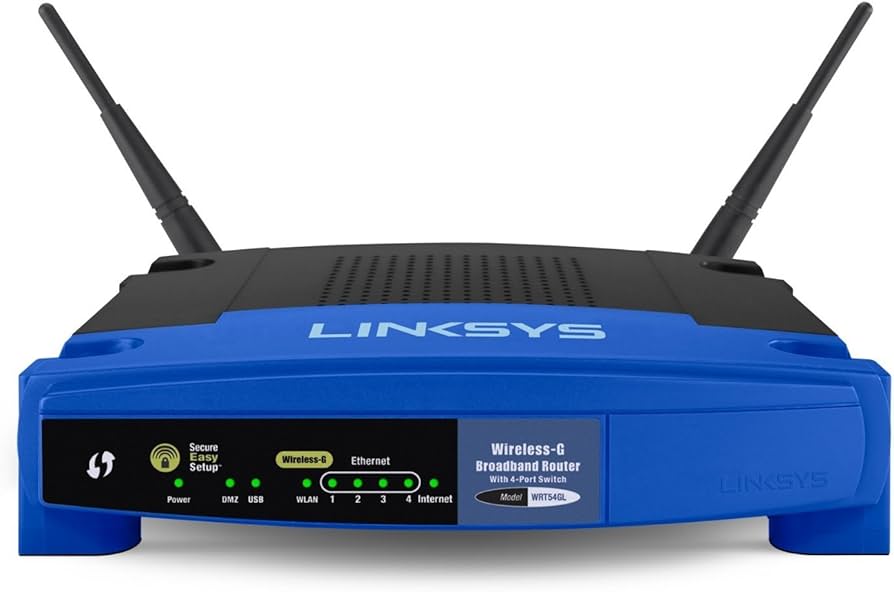
There are open hardware router options like the Turris Omnia and the OpenWRT One, but they can be expensive or require construction. Consumer routers may work with open firmware like OpenWRT and FreshTomato, but the installation process can be tedious – especially with no prior experience.
 |
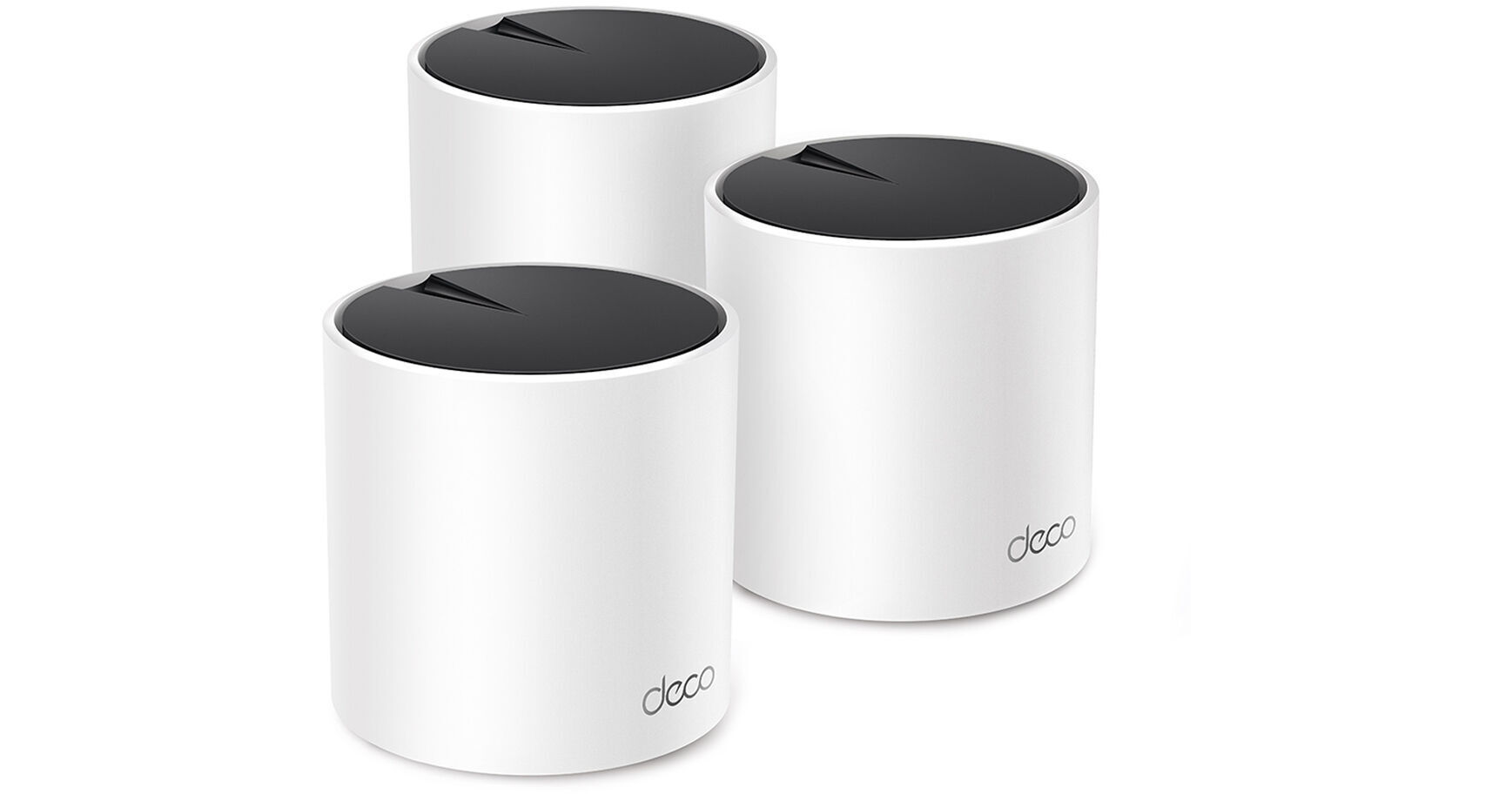 |
Thankfully, most modern routers will fulfill the requirements to host your own home server. Mainstream manufacturers – such as TP-Link, Netgear, and ASUS – offer routers that cover the gamut between performance and price.
When using a mesh router, connecting your server to the hub closest to the modem will provide the best performance.
When investigating a router that can be used to host a personal server, these are the features required:
|
Alt_route |
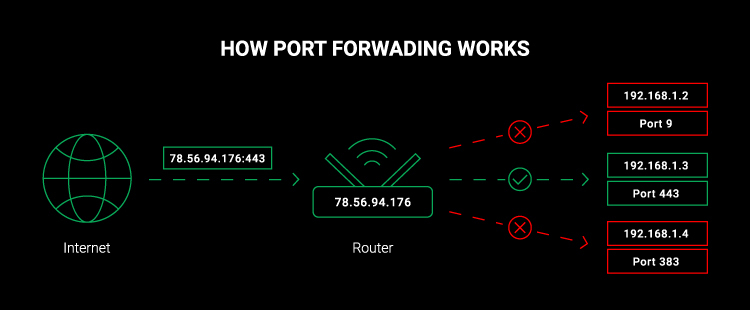
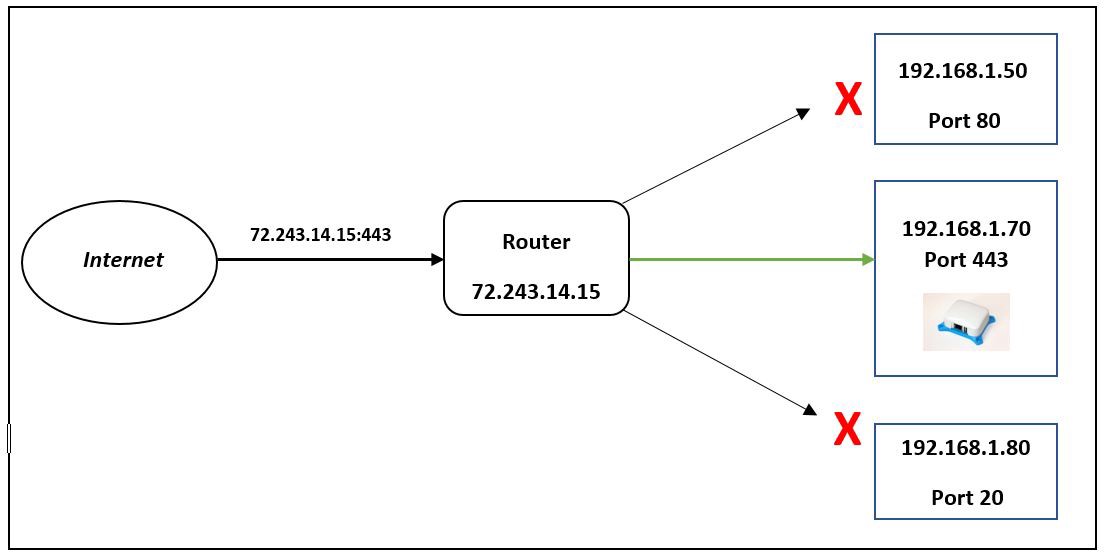
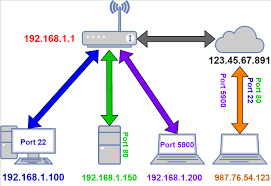
Port Forwarding You will need a router that supports Port Forwarding to allow traffic from outside the internet to be routed to your server within your Local Area Network.
While it is not illegal to host a server from home, your Internet Service Provider may restrict self-hosting a web server through a residential connection contract. You may be able to circumvent this by using an aftermarket router, but it may be considered a breach of contract.
|
|||
| Diamond_shine |
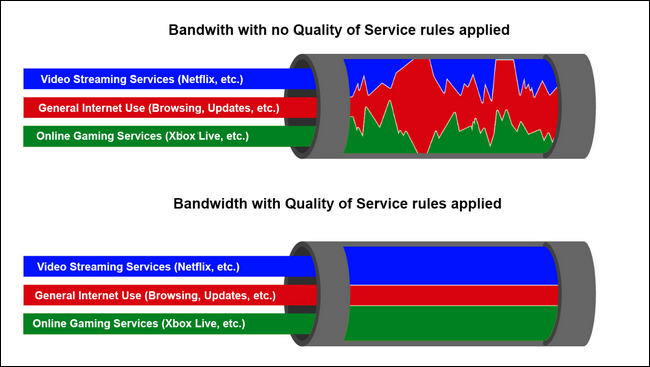
Quality of Service QoS (Quality of Service) enables you to give bandwidth priority to your server and other computer. Many consumer routers allow you to set the theoretical bandwidth provided by your Internet Service Provider and leverage that information to ensure that specific network devices have a minimum Internet bandwidth.
|
|||
| Vpn_lock |
Virtual Private Network The option to configure your router as both a VPN Server and VPN Client is becoming more common. A Virtual Private Network allows devices and networks to securely connect to each other over the open internet.  When acting as a server, your router makes it simple to connect to your Local Area Network, even while away from home. This will allow you to access your self-hosted services without making them available to the open Internet. While acting as a VPN server, you can connect to a VPN service you subscribe to – such as Proton VPN, Mullvad, and IVPN. This will hide all of the traffic on your Local Area Network behind the VPN service. This can transmit a lot of data through your VPN provider. Make sure your plan has the monthly bandwidth to accommodate every device in your home.
|
|||
| Dns |
Dynamic DNS Many modern routers provide a Dynamic DNS service, such as ASUS, TP-Link and Netgear. This allows you to connect to your home server as a subdomain of their service instead of buying your own domain. |




.jpg)

Cables & Accessories
Aside from the primary hardware – such as the server computer and a router to connect it to the Internet – we will also need miscellaneous cables and accessories to get everything setup.
Display
Our server will be "headless" – meaning we will be able to control it remotely over the network without using a keyboard, mouse or display. However, we will still need a display during the initial installation process or while troubleshooting.
|
Desktop_windows |
Display You will need a compatible display with a resolution greater than 640x480.
|
| Cable |
Cables You will need any applicable power cables or adapters. Similarly, we will need a compatible cable for connecting the display to our server. |
Input Devices
While we will be accessing our server remotely, we need some human interface devices – such as a mouse and keyboard for controlling the computer.
|
Mouse |
Mouse You will need a compatible USB mouse.
|
| Keyboard |
Keyboard You will need a compatible USB keyboard. |
Networking
We explored the router as an important piece of networking equipment, but there are other components that we will need to host a server.
|
Settings_ethernet |
Modem When you pay for access to an Internet Service Provider, they may lease or sell a modem that provides access to their service. Some ISPs also allow customers to purchase their own modem hardware.
|
| Keyboard |
Cables You will need at least two Category 6 Ethernet cables. These can handle blazing fast 2.5Gbit connection speeds over short cables while still maintaining minimum 1GBit speeds over distances of up to 100 meters – or 328 feet. |
External Storage
Computer systems are equipped with internal storage drives for storing the operating system, as well as your applications, files and media. When setting up and running a server, external storage devices are just as important.
These storage devices will be erased and any important data should be backed up.
|
Security_key |
Flash Drive We will need a USB Flash Drive to install the operating system on our computer and enable us to install server applications. This will need to be at least 8GB to fit the free Debian Linux image we will be downloading.
|
| Hard_drive |
External Storage Drive Connecting an external hard drive to our server – using USB, eSata or Thunderbolt – can expand your storage beyond what will fit inside your computer case.
Even more importantly, an external hard drive provides an easily accessible option for creating backups in the event there is a systems failure. |
Domain
You will need a domain name – such as example.com – to directly access your services from outside your Local Area Network (LAN). We will using this domain name to forward traffic to our Public IP address on the Wide Area Network (WAN).

You can also access your services away from home without a domain by using a VPN. Using a domain name can add a level of convenience for accessing your own services while still restricting access to your local area network.
Web Domain
Domain names are purchased through a domain registrar and there is a wide potential price range. Registrars often algorithmically assign prices for available domains based on expected popularity and ICANN registration fees.
Dynamic DNS
There are also free services that allow you to register an account and link your web server to their domain as a subdomain – such as DuckDNS or a similar Dynamic DNS service on your router. These give you a sub-domain name to use – such as user.duckdns.org – that can be automatically updated to point at your server.
VPN Provider
Your Internet Service Provider has the power to see information about the websites and data services you access while using their modem. While they cannot see the data being transmitted, they can see the servers you connect to. This is often used to build user profiles for targeted advertising or enforcing copyright law on peer-to-peer traffic.
Aggregation
We can lessen this by creating a private, encrypted tunnel to a VPN server connected elsewhere in the world. This will not provide total anonymity, but it can help obscure your traffic and make it harder to tell your traffic from other clients.

Behind a Virtual Private Network, your ISP can see that you've connected to a remote server but the traffic between is encrypted. Your web data is aggregated with other users to make your traffic less traceable back to you. This can also channel your Internet traffic to a specific geographic region.

If you're looking for additional privacy from your internet service provider – such as downloading files with qBittorrent or obscuring your AdGuard Home lookups – then a VPN service could be an option. Gluetun can connect individual containers to your VPN allowing you to circumvent geo-restrictions by changing your location – such as a MeTube server that can access Swedish internet content.
Learn more about the advantages of using a VPN provider.
Privacy Assurance
Not all VPNs are created equal and they have the same opportunities to snoop on your data just like your ISP. They may store logs and submit them to law enforcement agencies when asked. If they don't follow industry practice, they may have their databases hacked. Some providers have been implicated in data collections for government surveillance purposes. Others use your data to build user profiles they can sell to brokers.
|
|
|
VPN providers can, however, volunteer for third-party audits to ensure consumer privacy and build community trust. Privacy Guides is a non-profit that educates about personal privacy and independently reviews service providers. They recommend Proton VPN, Mullvad, and IVPN services.
About the Author
This library was created to advocate for technological freedom, equal access and transformative social justice. The creator is a designer, developer and information scientist who was shaped by open-source technologies.
- Positionality
- Intersectionality
Story
My name is Josh. I am queer, trans, non-binary and intersex. I am polyamorous with two
long-term live-in partners for the last 10 years. I am neurodivergent and autistic. I have dealt
with disability and chronic illness since I was a child, requiring multiple surgeries and life-long
treatment plans that have made it difficult to feel integrated into my community. I exist on the
fringe of what is commonly accepted within society and I can see it from a unique perspective. I
have longed to create a family and community for those who have felt shunned by theirs.
I am also a masculine-presenting White person, specifically working in technology spaces for a
decade. I am not judged solely on my physical being. Within our colonial and capitalist
systems, there is a structural authority assigned to me and I must always be conscious of
positionality. Even when I chose not to wield it, I am taking a stance. I have the option to hide
who I am, as required, for my own safety.
It is important to embrace the dichotomy and balance of “queerness” and “conformity” –
privilege and oppression. This discomfort can lead to growth and learning, building trust
between people and communities. Radical empathy requires seeing yourself from the
perspective of others and doing the work to understand not only your positionality and
intersectionality, but theirs. While I cannot and should not try to intuit your lived experience,
there are always ways to communicate.
I am a first generation student returning to school after dropping out as a teenager. I prefer
hands-on learning methods and my innate curiosity has always led me towards digging deeper.
I joined the MLIS program because I wanted to help people in the ways I knew how. I have
struggled in academic spaces but taught myself how to thrive. Now, I can help those who struggle in the ways I have. I am working on becoming a better advocate because it is not
enough to know about injustices and inequalities. We must do the work to transform knowledge
into praxis and this can mean changing the world or changing a single mind.
My father was a telecom engineer for a mobile phone company in the early 90s, granting
immense privilege through constant access to information and technology. As a teenager, I got
into designing and creating websites on a recycled computer with an open-source operating
system. Community and culture have always informed my approach to technology having
started out volunteering websites for local restaurants, organizations and artists. By exploring
my own inner artist, I have learned to appreciate the depth of expression that can exist within
simplicity. I write sci-fi and fantasy short stories and novellas. For work, I am currently a
researcher and technical writer. As a self-taught learner, I have insights on approaching
informal education within technology spaces. As I branched into interface design and user
experience, I began to see the value of assessment and evaluation.
I have embraced my role as an educator to build communities of practice and provide
opportunities for meaning-making. While I don’t think I will ever be someone who can stand in
front of a crowd and effortlessly orate, I can be a different kind of educator. I believe in the
creative and social power created through workshops and participatory sessions. I am a
facilitator who can meet a person at their understanding and bridge the gap.
Throughout my undergrad, I built relationships with local museums and libraries to develop
open-source technologies for everyone. As part of a local community, we created
educator-facilitated lesson plans that could be shared with elementary school children trapped
at home during the pandemic. This was a truly world-changing experience that taught me the
power of technology in the hands of the people, as well as the struggles of digital access.
Public institutions have the opportunity to create a new relationship with technology; one that they have a voice in. Technology should be created locally by the communities that need them
and shared globally for the potential betterment of everyone. Part of this mission is also
teaching people how to involve themselves. Open technologies allow us to build around mutual
needs by focusing on community and consensus instead of power. We create better things
when we work together – and we gain a deeper understanding of the potential ramifications.
Closed doors do nothing to broaden perspectives and radical change requires doing things
Motivation
- There are a myriad of guides out there for creating your own server – even for people new to
computers. These days, the process is relatively simple and automated. I have never found
one viewed through a critical perspective and I feel this knowledge is imperative to information
freedom. We must highlight how we have created and maintained the system (often at the
expense of communities), while also offering ways to reflect on how we can involve ourselves
(and others) in systems that have been transparently crafted to be exclusionary. While the
technical aspects become easier, the human questions become larger as they are pushed
uphill: what are the social, ethical, moral, and security considerations that will affect the identity,
privacy and livelihood of both people and communities?
Technology is a convoluted and confusing mesh of topics. “Diversity in technology” is our
current framework for seeing ourselves represented in the technologies we use – and it should
encompass the diverse ways we can be included in technology. From my experience, this is
what’s most overwhelming for people looking to learn technology: where do I even begin?
By providing the basic concepts alongside more in-depth resources, participants can spark
curiosity to explore the web of technology. Even if you don’t want to code, your voice matters
when you are given the power to express yourself. “Talking back” is of critical importance if we
ever hope to critically examine and address our relationship with technology. While far from
perfect, open technologies focus on community and help people see how they might be involved
in the systems churning around them.
Technology has been a largely white cis hetero space and has predominantly worked to
accelerate colonial white supremacy. This has happened through the erasure of the stories
behind our advancements. The first “computers” were women – who programmed our first
digital computers – and it took until 2005 for their names to be recognized. Erasing these
histories has only perpetuated the idea that not everyone belongs in technology. While we can say that we need to “increase diversity in technology”, we have not worked to create a
welcoming space where people can see themselves in technology. We can help people
embrace that their voice is important and can make a difference.
Teaching Objectives
- Never a failure, always a lesson.
- Education as the practice of freedom
- One possible alternative to the banking model is the problem-based learning model (similar to what Freire called problem-posing education), in which students are encouraged to think and actively solve problems presented to them by the teacher.[5][6]
- Identity
- Prescott, M., Ewing, R., and O’Dea, M. (2018). “Where Are We Now? Gender, Technology, and Libraries.” Library Technology Conference, https://digitalcommons.macalester.edu/libtech_conf/2018/sessions/32/ [download the .pptx file]
- Yoose, B. (2015). “Your code does not exist in a vacuum.” Code4Lib Annual Conference, https://code4lib.org/files/c4l15yoose.pdf.
- Harihareswara, S. (2015, April 15). User experience is a social justice issue.Code4Lib Journal. https://journal.code4lib.org/articles/10482
- To me, the best case scenario is not that everyone instantly understands the technical concepts
being taught to them, but instead that they learn to grapple with how the applications of these
technical concepts have begun to affect their personal lives. While computers are part of our
everyday lives, we don’t think about them and – even more nefariously – we are taught by tech
companies not to think about them. I consider the lesson a success when someone can
articulate their questions about what these technologies mean for their privacy, or why computer
science history has been paved over in favor of our current narrative. As a corollary, failure
means completing the entire process without critical reflection.
Philosophy
-
Stommel, J. (2017, October 26). Why I Don’t Grade. Jesse Stommel. https://www.jessestommel.com/why-i- dont-grade/
- Magnus, E., Faber, M., & Belanger, J. (2019). A Consideration of Power Structures (and the Tensions They Create) in Library Assessment Activities. Library Assessment Conference Proceedings, 600–606.
- Winner, L. (2004). “Technologies as forms of life.” In Kaplan, D M. (Ed.) Readings in the Philosophy of Technology. Rowman & Littlefield, pp. 103-113. Winner - Technologies as forms of life.pdf
- They are different faces of the same coin – wonder and criticality –
each placed in careful balance through reflection. Community is an important aspect of
education; while we can learn by ourselves, we gain knowledge and ultimately grow through our
connections within the community of practice.
Qualitative growth is more important than quantitative assessment. What we learn may be
important, but it is just as critical to understand how we learn and why. True growth requires
both criticality and vulnerability with reflection as our tool for understanding the strides we’ve
made and the journey we still have left to go. Just as we can never know the ways a book will
affect its reader, we cannot objectively quantify how our lessons will affect the trajectory of their
day, quarter or life. As an educator, our job is – as bell hooks described – to “teach in a manner
that empowers students” to be "actively committed to a process of self-actualization."
While the “sage on the stage” has a place within instruction, I prefer to work within participatory
community spaces. We all learn from each other and build a collective understanding through
our relationships with each other. I may not be able to find the right analogy in the moment – to
find the spark of connection across differences in life experiences – but within a community of
practice, it is not my job alone. By valuing the voice of a community, we can explore the nuance
surrounding what it means to be humans with differing needs. - Freire's intended audience is radicals—people who see the world as changing and fluid—and he admits that his argument will most likely be missing necessary elements to construct pedagogies in given material realities.[1]: 37–39 Basing his method of finding freedom on the poor and middle class's experience with education, Freire states that his ideas are rooted in reality—not purely theoretical.[1]: 37
- We learn facts out of context of application in school. How will this history, science, math show up in our lives, in the work of growing community and home?
- We learn as children to swallow our tears and any other inconvenient emotions, and as adults that translates into working through red flags, value differences, pain, and exhaustion.
- We learn that tests and deadlines are the reasons to take action. This puts those with good short-term memories and a positive response to pressure in leadership positions, leading to urgency-based thinking, regardless of the circumstance.
- We learn that the natural world is to be manicured, controlled, or pillaged to support our consumerist lives. Even the natural lives of our bodies get medicated, pathologized, shaved or improved upon with cosmetic adjustments.
- To educate as the practice of freedom is a way of teaching that anyone can learn. That learning process comes easiest to those of us who teach who also believe that there is an aspect of our vocation that is sacred; who believe that our work is not merely to share information but to share in the intellectual and spiritual growth of our students. To teach in a manner that respects and cares for the souls of our students is essential if we are to provide the necessary conditions where learning can most deeply and intimately begin (hooks 1994: 13)
- In the book, Freire calls traditional pedagogy the "banking model of education" because it treats the student as an empty vessel to be filled with knowledge, like a piggy bank. He argues that pedagogy should instead treat the learner as a co-creator of knowledge.[1]
- https://en.m.wikipedia.org/wiki/Banking_model_of_education
- Freire argued that this model reinforces a lack of critical thinking and knowledge ownership in students, which in turn reinforces oppression, in contrast to Freire's understanding of knowledge as the result of a human, creative process.[1]
-
Freire describes this form of education as "fundamentally narrative (in) character"[3]: 57 with the teacher as the subject (that is, the active participant) and the students as passive objects.
Instead of communicating, the teacher issues communiqués and makes deposits which the students patiently receive, memorize, and repeat. This is the "banking" concept of education, in which the scope of action allowed to students extends only as far as receiving, filing, and storing the deposits.[3]: 58
- In the banking concept of education, knowledge is a gift bestowed by those who consider themselves knowledgeable upon those whom they consider to know nothing. ... The teacher presents himself to his students as their necessary opposite; by considering their ignorance absolute, he justifies his own existence.[3]: 58
-
Banking education follows the transmission model of education. This model views education as a specific body of knowledge that is transmitted from the teacher to the student. It emphasizes teacher-centric learning where students are passive absorbers of information and that the purpose of learning is memorization of facts.[4]
- any radical pedagogy must insist that everyone’s presence is acknowledged. That insistence cannot be simply stated. It has to be demonstrated through pedagogical practices. To begin, the professor must genuinely value everyone’s presence.
- Progressive, holistic education, “engaged pedagogy” is more demanding that conventional critical or feminist pedagogy. For, unlike these two teaching practices, it emphasizes well-being. That means that teachers must be actively involved committed to a process of self-actualization that promotes their own well-being if they are to teach in a manner that empowers students. (hooks 1994: 15)
- Freire's idea of dialogue. He first explains the importance of words, and that they must reflect both action and reflection. Dialogue is an understanding between different people, and it is an act of love, humility, and faith. It provides others with the complete independence to experience the world and name it how they see it. Freire explains that educators shape how students see the world and history. They must use language with the point of view of the students in mind. They must allow "thematic investigation": the discovery of different relevant problems (limited situations) and ideas for different periods.[1]
- “teachers must be actively committed to a process of self-actualization that promotes their own wellbeing if they are to teach in a manner that empowers students.”
-
“The purpose of education, finally, is to create in a person the ability to look at the world for himself, to make his own decisions… What societies really, ideally, want is a citizenry which will simply obey the rules of society. If a society succeeds in this, that society is about to perish. The obligation of anyone who thinks of himself as responsible is to examine society and try to change and fight it – at no matter what risk. This is the only hope that society has. This is the only way societies change.”
— James Baldwin, “A Talk to Teachers,” 1963
- No level of individual self-actualization alone can sustain the marginalized and oppressed. We must be linked to collective struggle, to communities of resistance that move us outward, into the world.
-
It is certain, in any case, that ignorance, allied with power, is the most ferocious enemy justice can have. —James Baldwin
- It is easy for the oppressed to fight their oppressors, only to become the opposites of what they currently are. In other words, this just makes them the oppressors and starts the cycle all over again. To be fully human again, they must identify the oppressors. They must identify them and work together to seek liberation. The next step in liberation is to understand what the goal of the oppressors is.[1]: 58
- The professors present at the first meeting were disturbed by our overt political standpoints. Again and again, it was necessary to remind everyone that no education is politically neutral. Emphasizing that a white male professor in an English department who teaches only work by “great white men” is making a political decision, [they] had to work consistently against and through the overwhelming will on the part of folks to deny the politics of racism, sexism, and so forth that inform how we teach.
- During this time, he noticed that his students had an unconscious fear of freedom, or rather: a fear of changing the way the world is.[1]: 35 Freire then outlines the likely criticisms he believes his book will face.[1]: 37
- Escape from Freedom is a book by psychoanalyst Erich Fromm, first published under that title in the United States by Farrar & Rinehart[1] in 1941 and a year later as The Fear of Freedom in the UK by Routledge & Kegan Paul. It was translated into German and first published in 1952 under the title Die Angst vor der Freiheit (The Fear of Freedom). In the book, Fromm explores humanity's shifting relationship with freedom, how individual freedom can cause fear, anxiety and alienation, and how many people seek relief by relinquishing freedom. He describes how authoritarianism can be a mechanism of escape for such people, with special emphasis on the psychosocial conditions that enabled the rise of Nazism.
- A community of practice (CoP) is a group of people who "share a concern or a passion for something they do and learn how to do it better as they interact regularly".[1] The concept was first proposed by cognitive anthropologist Jean Lave and educational theorist Etienne Wenger in their 1991 book Situated Learning.[2] Wenger significantly expanded on this concept in his 1998 book Communities of Practice.[3] A CoP can form around members' shared interests or goals. Through being part of a CoP, the members learn from each other and develop their identities.[2]
- For Etienne Wenger, learning in a CoP is central to identity because learning is conceptualized as social participation – the individual actively participates in the practices of social communities, thus developing their role and identity within the community.[7] In this context, a community of practice is a group of individuals with shared interests or goals who develop both their individual and shared identities through community participation.
- A project team is driven by deliverables with shared goals, milestones and results. A community of practice is often organically created, with as many objectives as members of that community.
Next Steps
Now that we have a better understanding of the project we're undertaking and the hardware that will be required, we can purchase and begin to setup our hardware.
host