
Power
Operating a server requires electricity to power all of the running parts – from the server itself to the electronics that maintain your Internet connection or attach external storage disks. By choosing to self-host, we not only retain digital autonomy but can consider our effect on the ecosystems around us.
When paying your power bill, wattage is how we quantify how much energy is being used per second. The power draw of a device is measured over time – typically expressed as kilowatt-hours or kWh. Utility companies offer consistent access to power by the kilo-watt hour, generated from both renewable and consumable fossil fuels.
Energy can comes from many sources and some are harmful. Learn more about where your energy comes from.
Home electronics are made to work with standard power outlets and do not require much conscious planning – plug a device in and it just works. Despite this, electronics must have information about their power requirements right on them. This can help estimate how much an always-on computer costs to operate per payment cycle.
Power Consumption
Power Supply Units – or PSUs – provide electricity to individual components within a computer. These specify the wattage that the power supply can draw during a heavy work load. This is only maximum possible power draw and isn't an indication of how much power the computer will consume while idle.
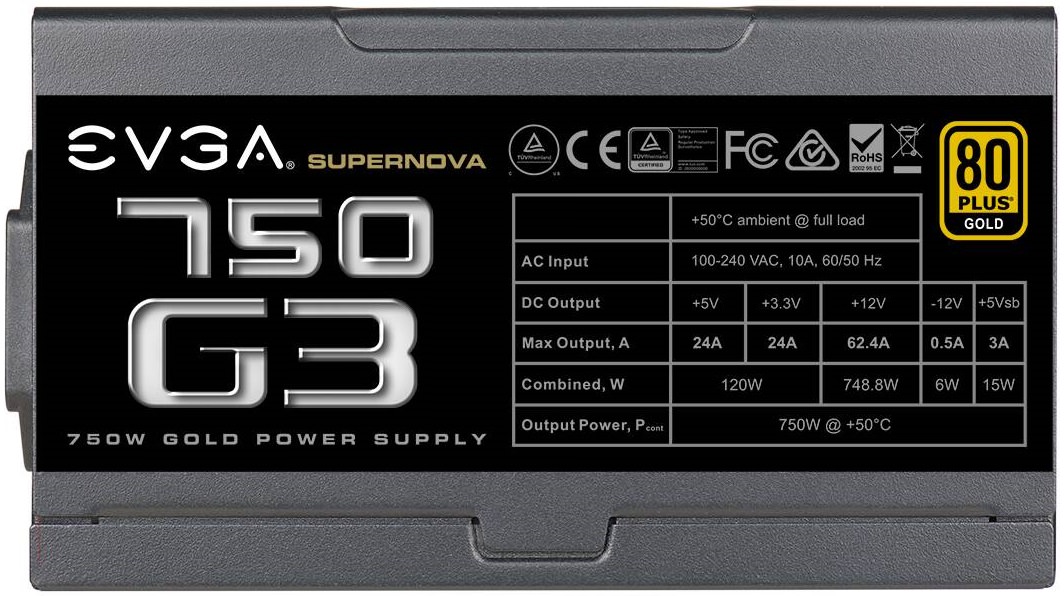
Each component connected to the PSU will need to draw power in order to function and every computer has different parts. The exact amount fluctuates based on their workload and the function being performed – converting a video requires more power than inputting text into a text editor. An operating system manages power, putting idle parts to sleep – or a low-power mode that conserves electricity.
Servers can draw a lot of power at once and should be plugged directly into a wall socket, not a power strip or extension cable.
CPUs and GPUs generally require the most power, but parts designed for mobile devices are extremely efficient. By exploring the average power usage for computer components – both idle and under load –you can estimate how much power the server will consume over the course of a day.
Power Consumption in Watts
| Component |
Idle | Under Load |
| Motherboard | 15 | 25 — 100 |
| Desktop CPU | 10 — 30 | 75 – 250 |
| Desktop GPU | 10 — 50 | 200 – 500 |
| Mobile CPU |
5 — 15 |
15 — 65 |
| Mobile GPU | 10 — 100 | 35 — 150 |
| Hard Disk Drive | 5 | 5 — 15 |
| Solid State Drive | 1 | 1 — 5 |
| RAM module | 2 | 2 – 5 |
These numbers are the instantaneous power usage by the computer – measured in watts. These are a helpful baseline, but power draw will fluctuate. When not actively in use, a modern system might consume around 100W. Office tasks like browing the web or writing an email may require 250W, while a graphic-intensive video game could draw up to 800W.
Want a better idea? Try out pcpartpicker.com and add your exact components.
When connecting your server to the Internet, the modem and router will also consume electricity. While this may be a lot less than a server, that power still needs to be accounted for. These devices will also draw more power when under a heavy load – such as streaming multiple videos.
Graph comparison of device wattage
Power Consumption in Watts
| Device | Idle | Under Load |
| Raspberry Pi 5 | 3 | 3 — 7 |
| Laptop | 5 | 30 — 200 |
| Mini PC | 5 — 20 | 20 — 400 |
| Desktop PC | 35 — 100 | 150 — 300 |
| Workstation | 75 — 150 | 300 — 800 |
| Wi-Fi Router | 5 | 5 — 20 |
| Modem | 5 | 5 — 20 |
Want to be exact? Try out a digital power meter to find your exact energy usage.
Cost Estimates
Once we have a better idea how much energy we'll require – in the form of wattage – we can estimate how much power that will consume over the course of an entire day.
Don't want to do math? Try out this wattage calculator from EnergyBot.
You calculate this by multiplying the total wattage you estimated by the number of hours a day the server will be drawing power. This will be 24 hours per day. We now have our wattage per hour. Finally, we can divide this number by 1000 to achieve our kilowattage per hour.
E(kWh/day) = P(W) × t(h/day) / 1000(W/kW)
A 200 watt Mini PC will use 4.8 kWh per day – or 144 kWh per month – when left running all day, every day.
Knowing the kilowatt hours consumed by the server, you can estimate the monetary cost per day. Your utility provider will list the exact unit price per kW/h on your account summary or service bill.
The cost of energy varies widely across the country – depending on a host of factors – and ranges all the way from $0.10 to $0.43 per killowat-hour. Energy rates for homes and residences are often higher than prices for businesses due to the economy of scale.

With this information, it's simple to calculate a monetary cost. By multiplying the cost per kilowatt by the quantity of kilowatts, we arrive at the final cost. When estimating per month, we can see how much our server affects our monthly bill.
Energy costs $0.12 per kWh in Washington State and a 200 watt computer uses 144 kWh over 30 days. This means that it costs $17.28 per month to run an always-on server.